Help Centre / Amazon fees and profit explained
VAT basics for Amazon sellers and how SellerFuse handles each case
Learn when an Amazon seller has to register for VAT, how standard rate and the Flat Rate Scheme differ, and how SellerFuse works out profit for each.
Why sellers use it
- Understand how your VAT position changes the profit you keep on every sale.
- Set it once and SellerFuse works VAT out on sales, fees and cost of goods.
- Change your position later and your whole order history is recalculated.
VAT changes your real profit on every Amazon sale, and it works differently depending on whether you are registered and which scheme you use. Get it wrong and your figures can be out by a sixth of your sales. This guide covers the basics from HMRC's guidance on GOV.UK, then shows how SellerFuse handles each position. It is not tax advice: speak to your accountant about your own business.
Where to find it
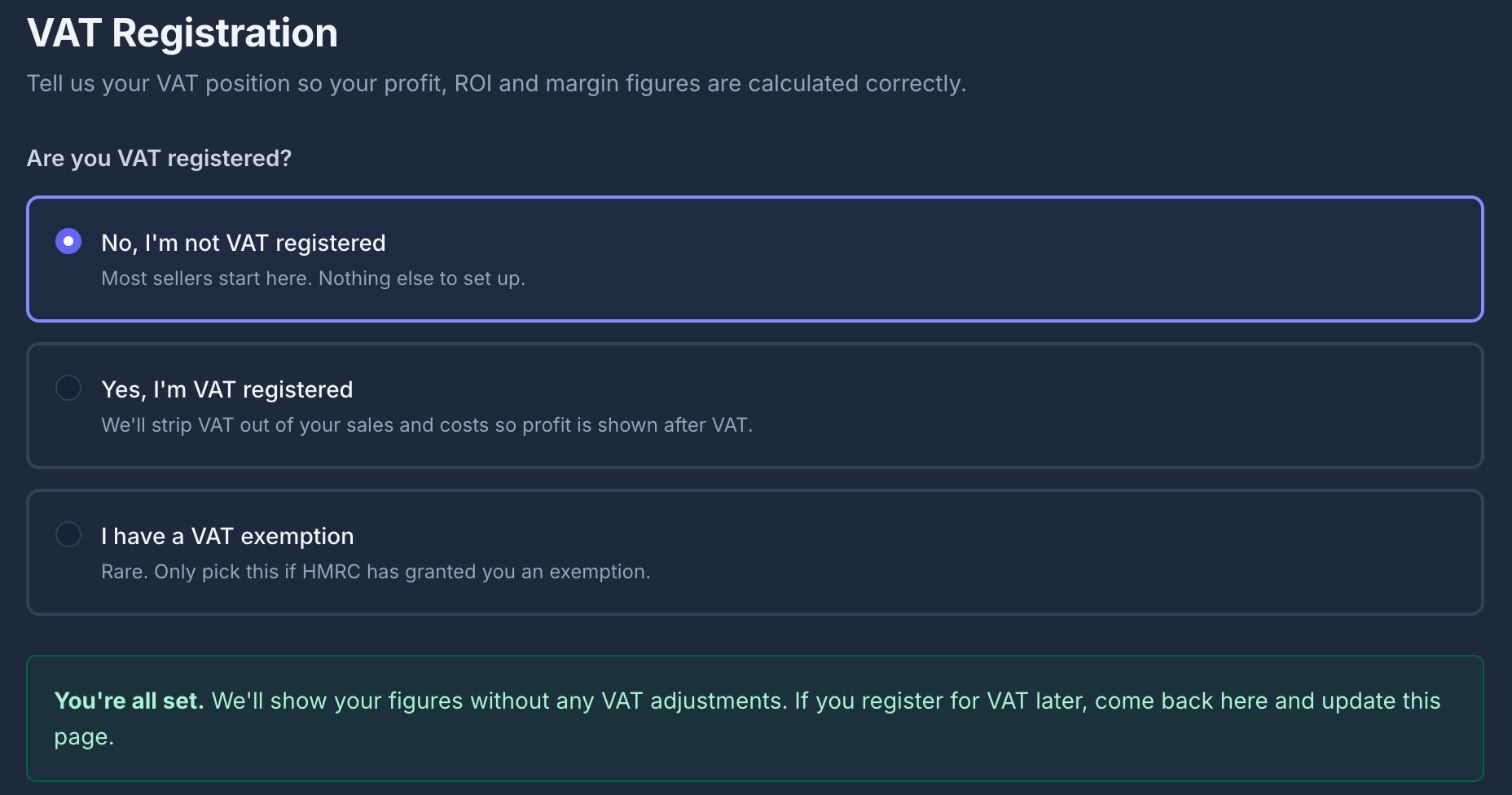
In the menu, open My Settings, then My Account. In the settings list on the left, click VAT Registration.
When you have to register
GOV.UK says you must register for VAT if either:
- your total taxable turnover for the last 12 months goes over £90,000 (the VAT threshold), or
- you expect your taxable turnover to go over £90,000 in the next 30 days.
The 12 months is a rolling period, not your tax year, so check it every month. You can also choose to register when your turnover is below £90,000. GOV.UK calls this voluntary registration.
VAT rates
GOV.UK lists three rates: the standard rate of 20% for most goods and services, a reduced rate of 5% for some, and a zero rate of 0% for items such as most food and children's clothes. The rate depends on the product, not on you.
The three positions
Not registered
You don't charge VAT on your sales. You also can't reclaim the VAT you pay, so the VAT on your stock and the VAT Amazon charges on its fees are costs to you.
Registered on the standard rate
GOV.UK says a VAT registered business must charge VAT on the goods it sells unless they are exempt, and can reclaim VAT on items bought for use in the business, with valid VAT invoices. So part of every sale is VAT you pass to HMRC, and the VAT on your stock and on Amazon's fees comes back to you.
Registered on the Flat Rate Scheme
Under the Flat Rate Scheme you pay HMRC a fixed percentage of your VAT inclusive turnover and keep the difference between what you charge customers and what you pay HMRC. The percentage depends on your type of business. GOV.UK says you can't reclaim the VAT on your purchases, except for certain capital assets over £2,000. You can join if you expect your VAT taxable turnover to be £150,000 or less (excluding VAT) in the next 12 months. A limited cost business pays a higher rate of 16.5%, and you get a 1% discount in your first year as a VAT registered business.
How SellerFuse handles each one
| Not registered | Standard rate | Flat Rate Scheme | |
|---|---|---|---|
| VAT on your sales | None | Taken out of the sale price | Taken out of the sale price |
| VAT on your cost of goods | Part of your cost | Reclaimed | Not reclaimed, part of your cost |
| Exports outside the UK | No VAT | Zero rated | Zero rated |
If you are not registered, SellerFuse counts the VAT Amazon charges on its fees as a cost, so your profit is what you really keep. If you are registered on the standard rate, that VAT is reclaimed, so it is not a cost. If you use the Flat Rate Scheme, you enter the percentage HMRC gave you for your type of business.
1Tell SellerFuse your position
In the menu, open My Settings, then My Account. In the settings list on the left, click VAT Registration. Pick No, I'm not VAT registered, Yes, I'm VAT registered or I have a VAT exemption. If you are registered, choose Standard rate or Flat Rate Scheme and enter When did your VAT registration start? Click Save Changes. See how to set up your VAT settings.
Orders before your registration date keep their figures without VAT. Orders from that date have VAT applied. Saving recalculates your whole order history in the background, which can take a few minutes.
2Check the VAT rate on your products
Your registration is one setting. The VAT rate on each product is another. Set it on each line in Cost of Goods, or let Auto VAT set it from the tax code on your Amazon listing.
3Check the VAT on an order
In Your Orders, hover over VAT on any order line. On UK orders it shows VAT on Sales, VAT On COGs, On Fees and Total VAT. See how to read Your Orders.
Common questions
Should I enter my cost of goods with or without VAT?
With VAT: the price you actually paid. SellerFuse takes the VAT back out if your position lets you reclaim it.
I'm close to the £90,000 threshold. Can SellerFuse tell me?
Your sales for any period are on the dashboard, and the Monthly Breakdown can show the last 12 months. Check your taxable turnover with your accountant, as it can include sales outside Amazon.
Which scheme should I choose?
That depends on your business, so ask your accountant. GOV.UK sets out how each scheme works, and your accountant can tell you which suits your figures.
Still stuck?
Members get priority live chat from inside SellerFuse, from our UK team. Not a member yet? Ask in our Discord community, which is open to everyone.