Help Centre / Getting started
How to set up your VAT settings in SellerFuse
Tell SellerFuse your VAT position so profit, ROI and margin are worked out correctly on every order.
Why sellers use it
- Profit shown after VAT, worked out for your exact VAT position.
- Non registered sellers see Amazon's VAT on fees counted as the cost it really is.
- Change it any time and your full order history is recalculated for you.
Your VAT position changes your real profit on every order. Set it once and SellerFuse works out VAT on your sales, on Amazon's fees and on your cost of goods for you.
Where to find it
You set your VAT position during setup. To change it later, open Settings from the menu under your name, then VAT Registration. The page is called VAT Settings.
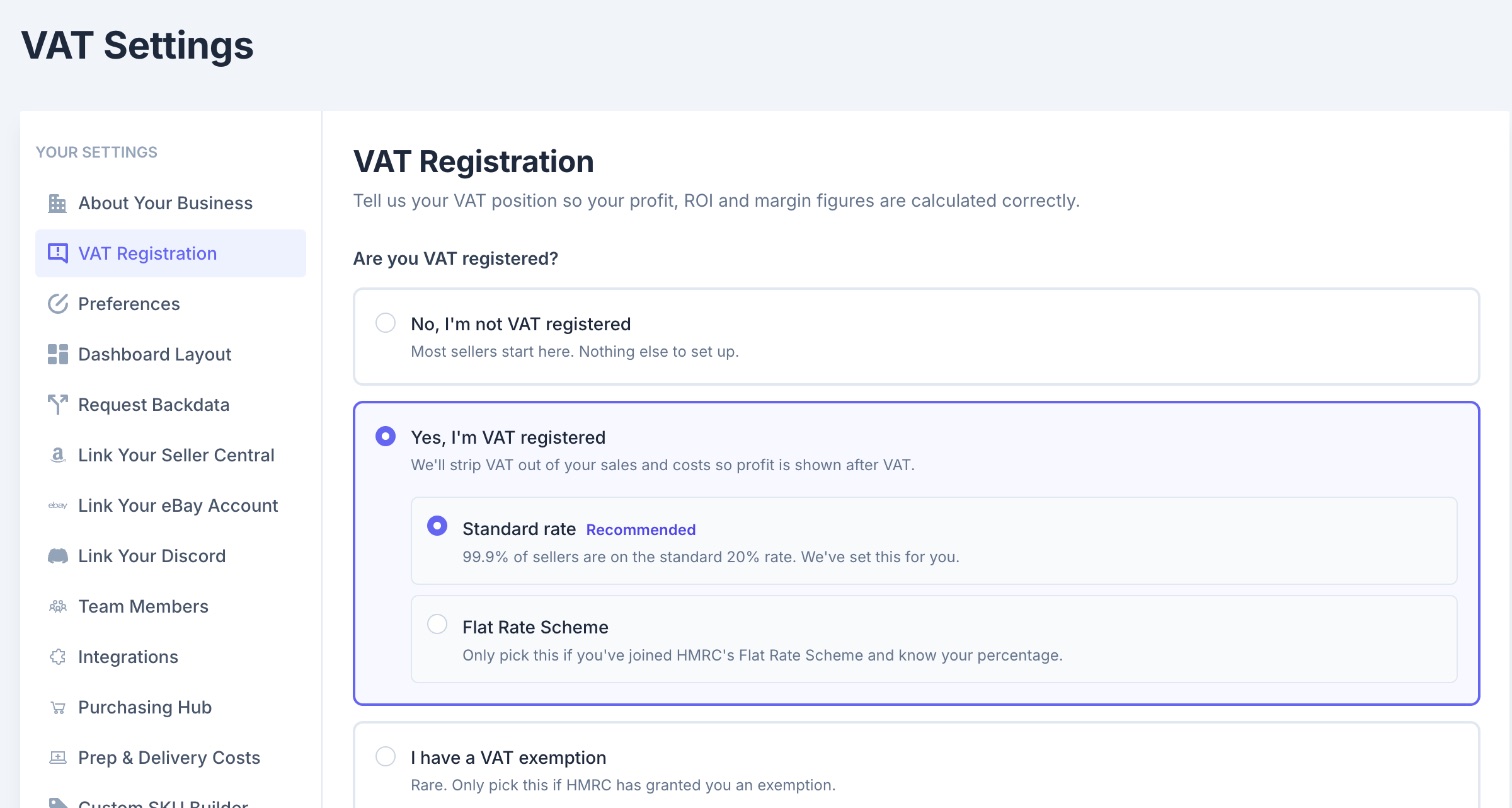
1Are you VAT registered?
Pick one of three options.
- No, I'm not VAT registered. Most sellers start here, and there is nothing else to set up.
- Yes, I'm VAT registered. SellerFuse takes VAT out of your sales and costs, so profit is shown after VAT.
- I have a VAT exemption. Only pick this if HMRC has granted you an exemption.
2If you are VAT registered
- Pick Standard rate or Flat Rate Scheme.
- Standard rate is set to 20%. Leave it unless you are certain yours is different.
- Flat Rate Scheme: only pick this if you have joined HMRC's Flat Rate Scheme. Enter the percentage HMRC gave you for your business category.
- Enter When did your VAT registration start? This date is required. SellerFuse applies VAT to orders from this date onwards, so earlier orders keep their figures from before you registered.
If you have an exemption, enter the Start date of the exemption period. Leave the End date blank if it is still active.
3Save
Click Save Changes. SellerFuse recalculates VAT across your full order history in the background. Your figures can take a few minutes to update.
How your VAT position changes your profit
| Not registered | Registered, standard rate | |
|---|---|---|
| VAT on your sales | None | Taken out of the sale price |
| VAT on Amazon's fees | A cost to you | Reclaimed, so not a cost |
| VAT on your cost of goods | Part of your cost | Reclaimed |
| Exports outside the UK | No VAT | Zero rated |
If you are not VAT registered, Amazon still charges 20% VAT on its fees and you can't reclaim it. SellerFuse counts it as a cost, so your profit is what you really keep. You can work it out for any sale with our free Amazon VAT on fees calculator.
VAT rates on your products
Your registration is one thing. The VAT rate on each product is another: most are 20%, some are 5% or 0%. You set the product VAT rate on each line in Cost of Goods. The Auto VAT button there sets each rate from the tax code on your Amazon listing.
Optional: per product VAT reclaim
VAT registered sellers who can't reclaim VAT on some of their stock can tick Enable per-product VAT reclaim override under Advanced. This adds a Reclaim? tick box to each line in Cost of Goods.
Inc VAT and Ex VAT stock values
If you are VAT registered, the Inventory by Status card on your dashboard has Inc VAT and Ex VAT buttons, so your stock value can match your accounts. Your profit and ROI do not change.
Common questions
I registered for VAT part way through the year. What happens to older orders?
Enter your registration start date. Orders before it keep their figures without VAT, and orders from that date have VAT applied.
Do I need to change anything if I'm not VAT registered?
No. Pick "No, I'm not VAT registered" and you are done.
Will changing my VAT settings change my past profit figures?
Yes. Saving a change recalculates VAT across your full order history, which can take a few minutes.
Still stuck?
Members get priority live chat from inside SellerFuse, from our UK team. Not a member yet? Ask in our Discord community, which is open to everyone.