At Sellerfuse, we have just released a brand new feature for our members. This is going to be a tool which helps sellers to work out if they are due a refund, or to view all reimbursements and any reconciliation issues.
It’s called Reconciliation Hub, and it’s an Amazon Reimbursement Tool that will help you get your money back. Let’s explain how.
Unlike other services which charge up to 20% commission on any successful refunds, we provide this completely free of charge. If you aren’t signed up yet, what are you waiting for?
If you’d like to read more about Amazon FBA Reimbursements, please continue reading and I will explain everything in depth as always.
We completed a study in 2023 and found that 66% of Amazon Sellers were unaware of their inventory statuses, meaning they were unaware of potential reimbursements they could claim.
We’ve started this one at a faster pace than normal, so I’m going to take a step back now and explain things in depth.
TL;DR.. if you’re an Amazon Seller, ensure you are using some form of Reimbursement Software. Shameless plug, we have one included with Membership and you’ll be able to use this alongside the profit dashboard and Inventory management tools. We make the reimbursement process a little bit easier for sellers like yourselves.
So, What are Amazon FBA Reimbursements?
Well, we’ve just launched our Reimbursement Tool, and our members will get access completely free of charge. No commission. No Fees.
Amazon FBA Reimbursements Tools & Software are worth their weight in Gold. Let me explain why.
Understanding Amazon FBA Reimbursements
When you sell an item on Amazon, it goes well 95% of the time. Your buyer doesn’t complain, and you will get your money sent to your bank account.
But there are certain circumstances, the 5%, where you’ll be faced with a dilemma.
The customer raises a return request.
Do you know what’s one of the craziest things of all here? Amazon immediately accept the return, regardless of the reason, and without asking for any form of proof.
In accepting the return, they remove the Sale from your account, along with any money that you received.
This leaves a little grey area, what I like to call the Reimbursement Window.
The reimbursement window, is a time frame between the customer return request, and the final data Amazon give customers to return items.
This can be up to 60 days, depending on the time of year, and category of item sale.
Not every Amazon seller is aware of this. I recently onboarded a user, and in doing so had a chat about Reimbursements. Look what I found:

This user had over £300 in pending reimbursements, and had only ever been paid out on £6!
Amazon have automated systems which are supposed to reimburse you, but there’s been so many times that I have to manually chase them, that I literally decided to build this tool.
The Amazon FBA Reimbursement software is updated daily, to show you what’s been reimbursed, what’s pending, and what’s already been paid.
In addition to that, we have some cool features which show you exactly which date you should claim a reimbursement. It’s important to not let Amazon keep your money, it’s much better off in your account, right!
Why do sellers claim a refund and not return the item?
You see, I’ve been selling online for years, and I can’t make sense of this. It must literally be the fact that the customers hang onto hope that they receive a refund, and get to keep the item?
Unfortunately, it doesn’t work like that. At least sellers are protected to an extent.
I understand that some customers decide not to return the item, and I’ve actually done this in the past. For example, if they have purchased some trainers, tried them on (maybe in a bad mood…) and thought no good, let’s return them… only to try them on again later and come around to the idea that they like the item.
It’s far too much psychology for me to get involved in, so I’ll just stick to selling!
How do I get reimbursed for FBA returns?
When dealing with Reimbursements, the official note from Amazon is that you have to wait for the reimbursement window to be closed, and then Amazon will automatically reimburse. However, I know that I often have to manually get involved with this, going to Seller Central and requesting a reimbursement manually.
It does involve dealing with automated messages from the Customer Services team, but you will win the cases if you are consistently requesting your updates.
How to get reimbursement from Amazon as a seller?
Getting reimbursed by Amazon for FBA (Fulfilled by Amazon) returns, lost inventory, or other discrepancies is crucial for maintaining your bottom line as a seller. You can get reimbursed via Seller Central. Here, I’ll go through the steps.
1. Review Your Account Regularly
The first step is understanding that you can only get Reimbursed when the Reimbursement is actually due. If you are 1 day too early to request it, it will be rejected. I’ve even been told once to open a case later in the day.
Now, I don’t have the time to log into Seller Central on a daily basis, which is why I’ll use the Reimbursement Hub.

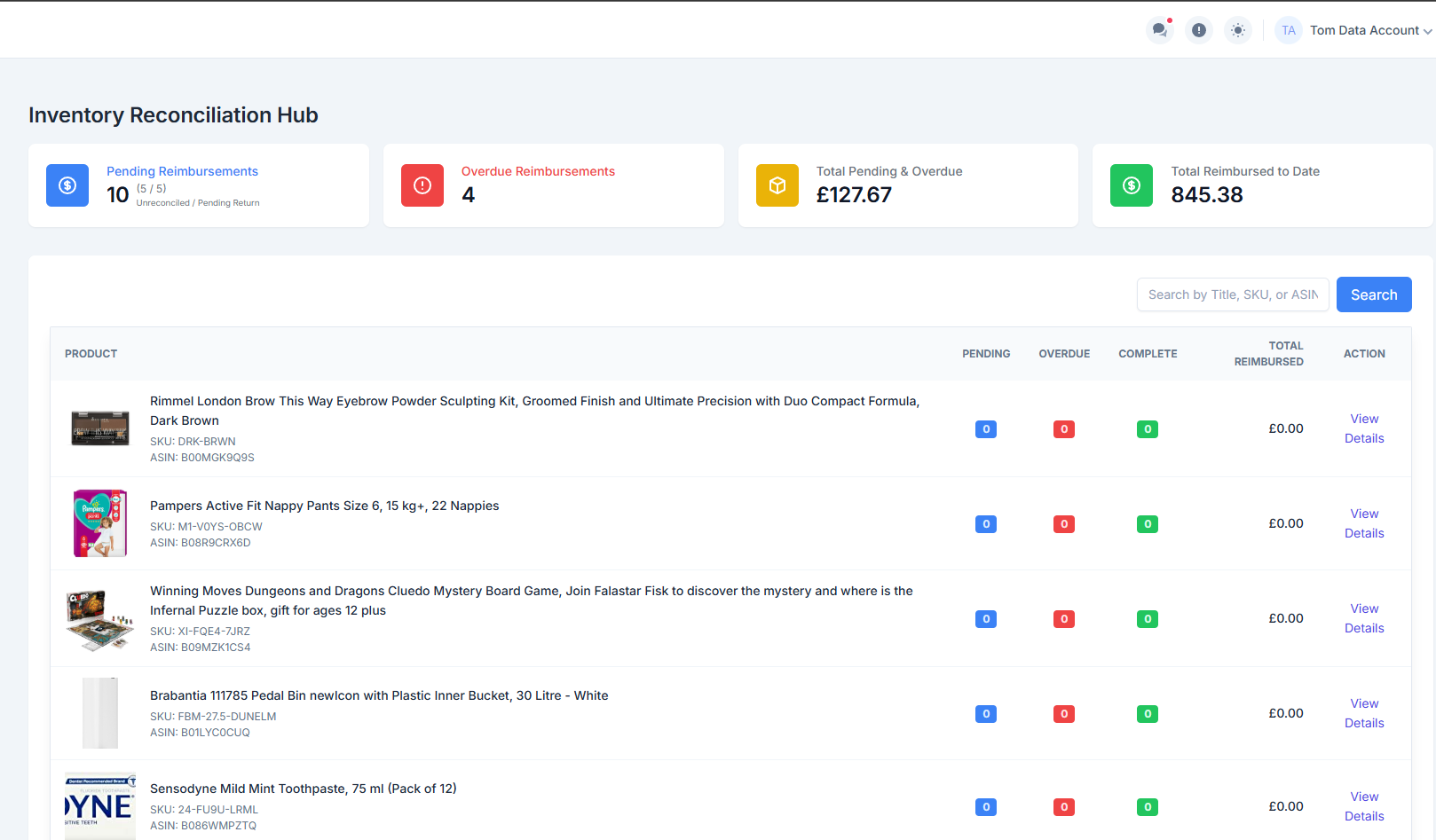
Immediately, I can see that I am overdue on 4 Reimbursements. In addition to this, I have 16 which are pending, so I should keep an eye on that. Either those 14 items will be returned, or I will need to advise Amazon.
So, I simply click on Overdue Reimbursements, open up the item and then navigate to Returns and Refunds.
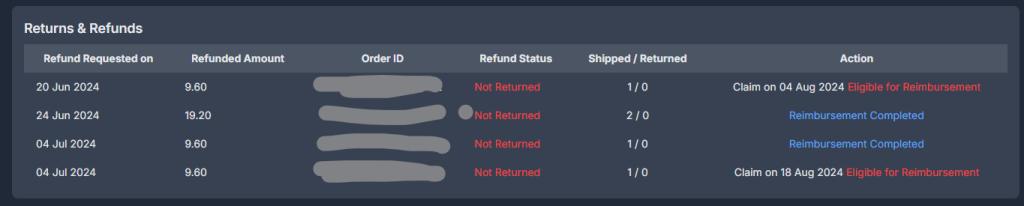
This immediately tells me that 2 orders are claimable. In addition to that, 2 orders have been reimbursed.
And look at that. None of these items have been returned.
Now, one month later I am still waiting for these two payouts. They paid the first two out as you can see Reimbursement Completed. However, on the other two, they are stating that personal hygeine products cannot be refunded.
So there you have it. I guess. But I’ll keep fighting.
2. Utilize the Amazon FBA Reimbursement Tool
While Amazon has its own systems in place to issue refunds automatically, these processes are not foolproof. This is where the Amazon FBA Reimbursement Tool comes into play.
The tool simplifies the tracking process by automatically identifying items that qualify for reimbursement and sending timely alerts.
By using it, you can save time and ensure you don’t miss potential reimbursements.
We are working on all available processes, and we are exploring how to automate this, so you don’t even have to worry about creating a case with Amazon.
3. Manually Submit Reimbursement claims
There will be times where you simply have to submit a request manually.
Just this week, I had some items returned from a Removal Order. It was a genuine mistake, I had ordered something and last minute, I realised that I sent in a mis-labelled item. So I re-called it, to save any further issues.
Upon return to my house, the post man apologised. Fortunately, we get on quite well and I could only see the funny side. He returned me a Flat Packed Box, with nothing inside.
Then he came back with plastic Royal Mail branded bag, and it was absolutely full to the brim, of plastic shapes. The item had been crushed on removal.
So just before I wrote this blog, I submitted my reimbursement request. I’ll keep you updated on the claims process.
Sellerfuse – 100% Free Amazon Reimbursement Software
Remember, if you are looking for an Amazon Reimbursement Tool, come and give our Free Trial a go. Test-drive Sellerfuse and let us know what you think.
Our FBA Reimbursement Software is included in the membership. You won’t be asked to pay a percentage of what you get back. And you’ll also have full access to your Profit Dashboards and so much more.
We aren’t just a reimbursement service, we are your Amazon Seller Tool, providing a comprehensive suite of seller tools.
FREE TRIAL BUTTON
Types of Amazon FBA Reimbursements
There are quite a few Amazon Reimbursements which you can claim back, which admittedly does make the reimbursement process a bit tougher if you’re manually looking through your ledger on a daily basis.
If you aren’t sure, we’ve summarised some of the main ones below.
Customer Failed to Return
I’ve already mentioned this one in detail. This is the main reimbursement reason you’ll find posted to your account. If they initiate the return process, but then fail to return the item, and the pre-paid label expires you’ll be reimbursed.
This does depend on reimbursement policies, as some items are non-returnable… meaning the customer can claim a refund and keep the item.
Warehouse Damaged
Warehouse Damaged is where the item has been checked into Amazon, and damaged whilst in their care. This is a burden on sellers, and our items really should be protected in Amazon’s Warehouses.
These reimbursements are typically easy wins, as Amazon admit a failure on their side.
Lost Warehouse
If an item is lost after it’s checked into Amazon, this will gain the title of Lost Warehouse. Again, Amazon will take immediate ownership of this one and reimburse you for this.
However, be aware that it is possible for Amazon to find your items and then actually reverse the reimbursement. You’ll see this listed as Reversal Reimbursement and the money is taken from your current available balance in your Amazon Seller Central account.
Lost Inbound
An item will become Lost Inbound, when you send an item into them, but they fail to check this into their Fulfilment centres.
This is one of the longer processes, and requires sellers to produce invoices and some more documentation to basically prove that you shipped the items to Amazon.
Damaged Outbound
If you sell an item, and it gets damaged on it’s way to the customer, you will see Damaged Outbound. This is quite rare, and I would say on the whole Amazon do typically take care of sellers goods.
Overcharged Fees
If you are over-charged for your Referral or FBA Commission paid, you will see these reimbursed. Again, this is quite un-common.
Customer Service Issue
I have seen a few examples of this, but unfortunately no Case ID to actually link this one too. So although there is a reimbursement labelled as Customer Service Issue, I am not completely sure what causes this one.
The Process of Raising Successful Reimbursement Claims
To successfully claim a reimbursement, you will be required to provide the following documentation:
-
- A description of the issue
-
- Any pictures, where required, to assist the case
-
- The Inbound Shipment ID & FNSKU
-
- The Quantity of affected items
If you provide this, Amazon will then investigate the case. It can sometimes take a few weeks, so make sure you add this to your Task Board and you’ll never forget about a reimbursement again.
Frequently Asked Questions
What are the typical reimbursement amounts for lost or damaged items?
There is no set amount, it can depend on the purchase price and the sell price of the item. Amazon are quite fair, and you will typically receive back your Cost of Goods, and in some circumstances you will receive a small profit.
How long does the reimbursement process take?
The reimbursement can be instant. If you enter the details on Seller Central, they will let you know immediately if it will be instantly reimbursed. These are then posted to your account within a 5-7 business days.
If you have to go through a Case, it can take a couple of weeks. All eligible claims will be paid out.
Manual claims will take a little longer
Are there any fees associated with using reimbursement tools?
Not with Sellerfuse. We provide a Reimbursement section in addition to our Profit Dashboard & Inventory Management Tools.
What is the benefit of using Amazon Reimbursement Services?
There is a huge administrative burden in rooting through your reports to check for reimbursements. This is valuable time you can use to source new items, or even have some downtime.
Our hub directly shows you what’s Pending & Overdue, so you can see exactly what reimbursements you’re due.