Help Centre / Dashboard
How to value your stock with Inventory by Status in SellerFuse
See what your stock cost, what it would sell for and the profit in it, split by Amazon status, with Inc VAT and Ex VAT views and a product breakdown.
Why sellers use it
- Know what your stock cost you and what it is worth at today's prices, in one table.
- See how much is stuck in damaged, researching or customer returns, not just sellable.
- VAT registered? Switch the figures between Inc VAT and Ex VAT in one click.
Your money is not just in your bank account. It is sitting in Amazon's warehouses, on its way in, or stuck as damaged or in research. Inventory by Status values all of it: what you paid, what it would sell for at your current prices and the profit left in it once Amazon's fees come out. It is the quickest way to answer "how much is my stock worth?"
Where to find it
In the menu, open Amazon, then Dashboard. Inventory by Status is below the charts, next to Your Top Selling Items.
Reading the card
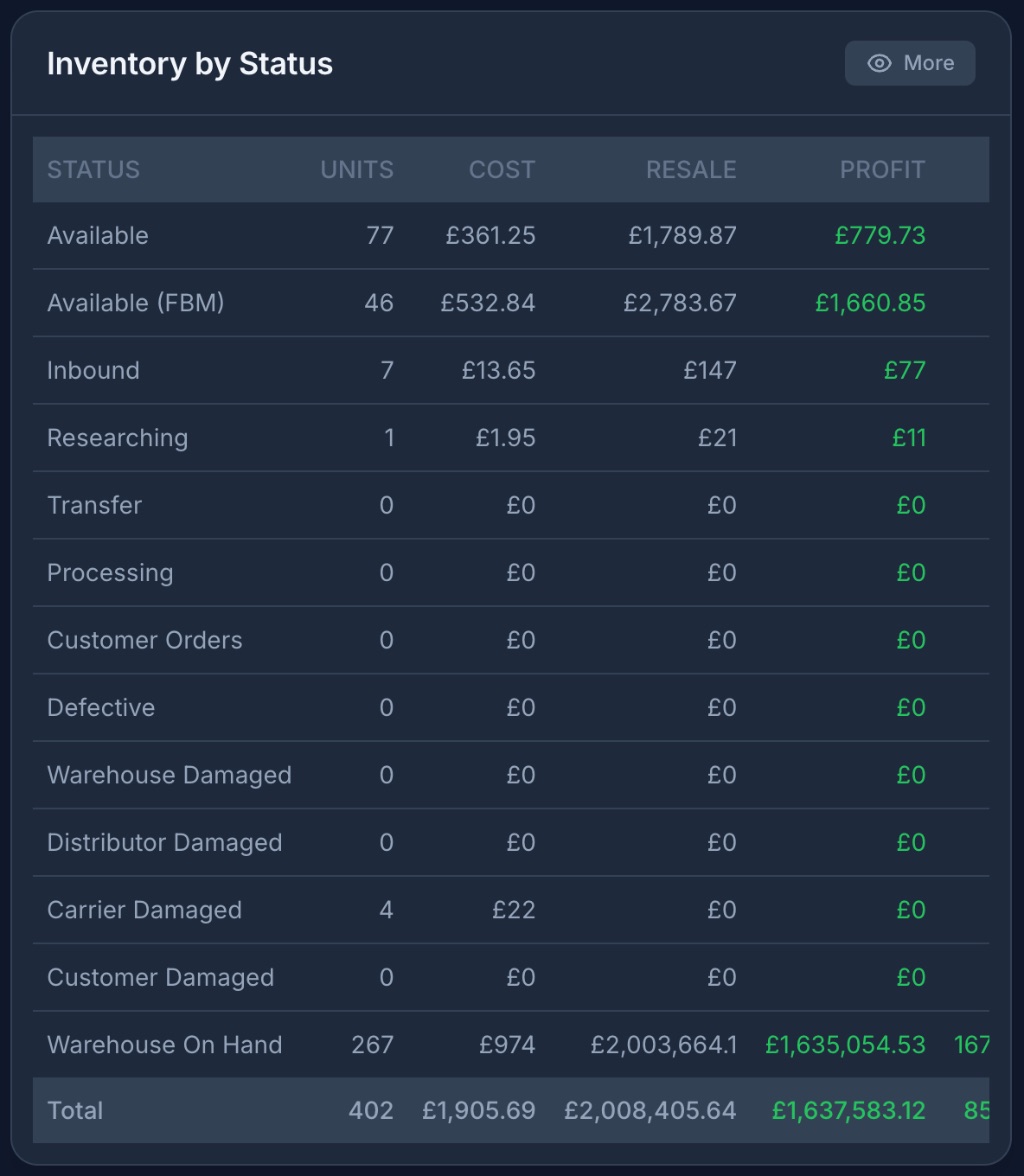
Each row is a stock status: Available, Available (FBM), Inbound, Researching, Transfer, Processing, Customer Orders, Defective and the damaged statuses (warehouse, distributor, carrier and customer). If you keep stock in your own warehouse in SellerFuse, it has a row too. The columns are:
- Units: how many units are in that status.
- Cost: what those units cost you, from your cost of goods.
- Resale: what they would sell for at your current prices.
- Profit: resale less cost and Amazon's fees.
- ROI: profit as a percentage of cost.
The Total row adds up every status. The card is about your stock today, so it does not change with the dashboard date dropdown.
Inc VAT and Ex VAT
If you are VAT registered, the card shows a VAT Applied badge, because profit takes off the VAT you will owe when the stock sells. You also get an Inc VAT and Ex VAT switch:
- Inc VAT shows cost and resale as you paid and as the customer pays.
- Ex VAT takes the VAT out of cost and resale. Profit stays the same either way.
On a flat rate scheme, Ex VAT takes VAT off resale only. Your cost stays as paid, because you do not reclaim VAT on purchases. SellerFuse remembers your choice on this browser, and the switch applies to the card and the breakdown window together. Check your scheme in VAT settings.
1Open the breakdown
Click More on the card. The Detailed Inventory Breakdown window opens, listing every product and status. Next to the subtitle it says how recently the figures were updated.
2Read the totals
The tiles at the top show Total Units, Total CoG, Total List Price, Total Fees and Total Profit. VAT registered sellers also see Total VAT, the VAT you would owe on that stock.
3Find a product
Type in the search box to find a product by SKU, ASIN or title. Use the status dropdown to show one status, for example only Inbound or only Customer Damaged.
4Change the view
- Per Item shows cost, fees and profit for one unit.
- SKU Total multiplies them by the units you hold.
- Group by SKU combines each product into one row, adding up its units across statuses.
- Inc VAT and Ex VAT work as on the card.
The table shows Qty, Unit CoG, List Price, Buy Box, Total Fees and Unit Profit. Click a heading to sort. Hover over the fees to see the referral, FBA and digital services fees and the VAT behind the total.
Common questions
Why does a product show N/A for profit?
SellerFuse needs both a cost and a price to work out profit. Add the product's cost of goods and make sure it has a price.
Why does a price say (est.)?
Where SellerFuse has no current price for a product, it uses an estimate so the stock is still valued, and marks it (est.) so you know.
Why is my damaged stock valued?
It still cost you money. Seeing it valued helps you decide what to claim back. Amazon may owe you for some of it, and the reimbursements tools help you check.
Still stuck?
Members get priority live chat from inside SellerFuse, from our UK team. Not a member yet? Ask in our Discord community, which is open to everyone.