Help Centre / Reimbursements and shipments
How to use the Reconciliation Hub to find money Amazon owes you
Learn what each part of the Reconciliation Hub shows, from short shipments to unreturned refunds, and when each Amazon claim opens and closes.
Why sellers use it
- See every short shipment and unreturned refund in one place, with the date each claim closes.
- Check each Amazon reimbursement against what the stock actually cost you.
- Keep removals and storage fees in view next to the money Amazon pays back.
Amazon loses stock, receives shipments short and refunds customers whose items never come back. It pays for some of this by itself, but not all of it, and every claim has a deadline. The Reconciliation Hub puts your shipments, returns, reimbursements, removals and storage fees side by side, so you can see what is still owed and act before the window closes.
Where to find it
In the menu, open Amazon, then Reconciliation. The menu item is greyed out until SellerFuse has your Amazon data.
You land on Your Reconciliation Hub, a page of cards: Shipments, Removals, Storage Fees, Reimbursements and Returns. Each card shows a Total, a red Needs Action count when something wants your attention, and a green money badge where there is an amount to show (for example, what Amazon owes you on short shipments).
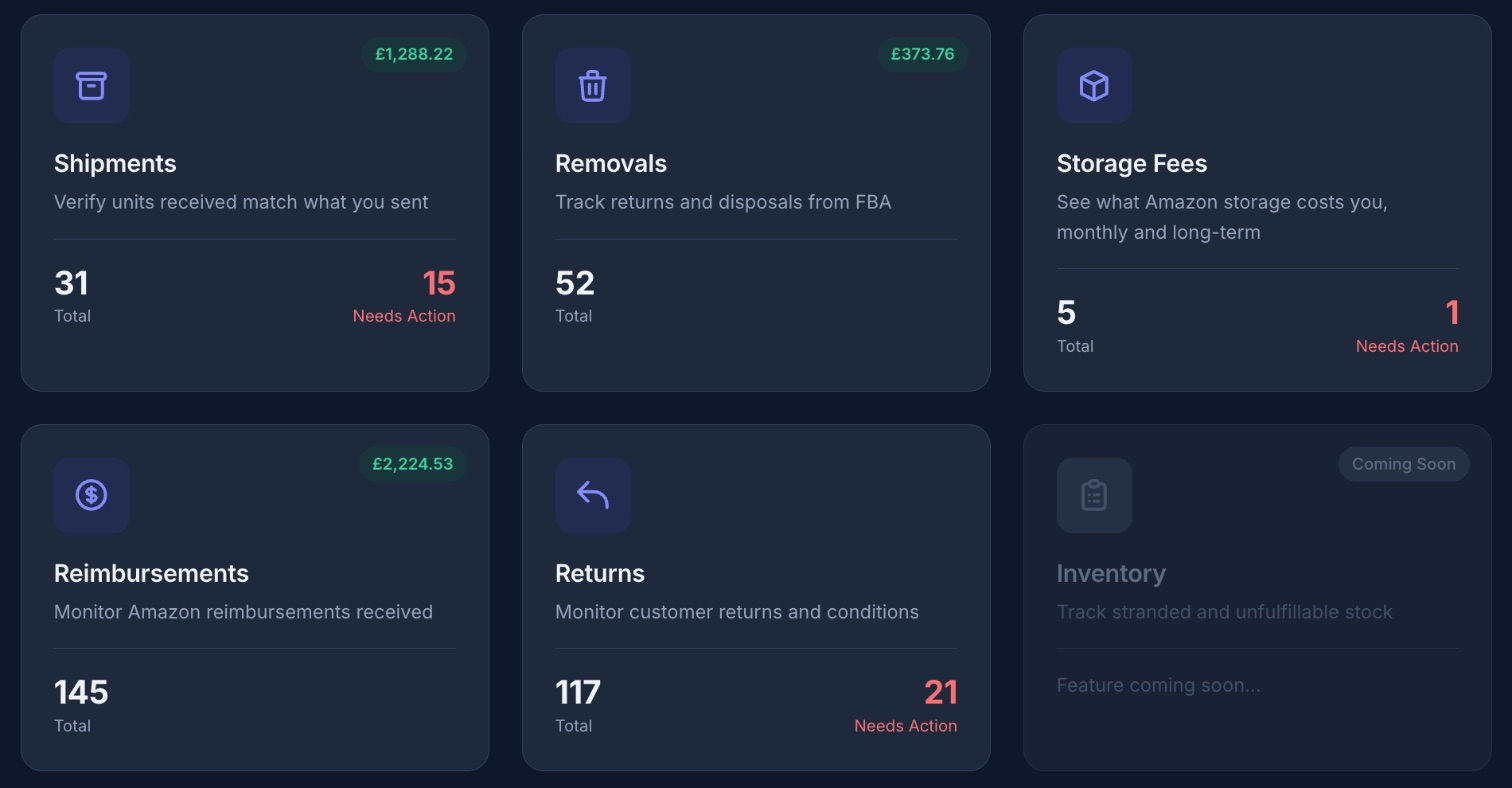
Click any card to open that section. Inside, the sections sit as tabs across the top of the Reconciliation page, so you can move between them without going back.
The five tabs
Shipments
Every closed shipment where Amazon received fewer units than you sent. Each row shows how many units are missing, what they are worth at your cost price, and the Claim deadline in plain words, such as "12 days left" or "Too late to claim". Four cards at the top double as filters: Needs your action, Closing within 14 days, Window closed, not claimed and Recovered from Amazon. See how to claim units missing from a shipment.
Reimbursements
Every payment and clawback from Amazon, with what Amazon paid next to what the stock cost you and the difference. Cards show what was Paid in the last 30 days, what was Clawed back, last 12 months, what was Possibly underpaid, last 12 months and what was Replaced with stock, last 12 months. See how to check reimbursements against your cost.
Returns
Every refund where the customer was meant to send the item back. Each row tells you what to do next: wait, claim from Amazon, or nothing to do because the item came back or Amazon already paid. See how to see which returns you can claim.
Removals
Your FBA removal orders, both returns to you and disposals, with the quantity, fee, status and tracking. Filter by status (Pending, Completed, Cancelled) or type (Return, Disposal). The Write Off button turns removed stock into a stock write off, so it comes off your stock and into your figures.
Storage Fees
What Amazon charged you to store stock, by product. It shows the Monthly Storage Fee and any Long-Term Storage Surcharge (Aged Inventory), with size tier, volume and quantity charged.
When a claim becomes due
Amazon only accepts claims inside a set window. SellerFuse works out the dates for you and shows them on each row.
| What happened | You can claim from | Last day to claim |
|---|---|---|
| Shipment arrived short | 15 days after Amazon first received the shipment | 60 days after Amazon first received it |
| Customer refunded, item never came back | Once 45 days have passed since the refund | 105 days after the refund |
On the Shipments tab, a claim that has not opened yet reads "Opens in N days", an open one reads "N days left" with the claim by date, and one inside the last 14 days is flagged so you file it first. A shipment with no receipt from Amazon yet shows "No date yet".
Overnight, shipments whose window has passed with nothing recorded are marked Claim window closed, so they stop counting as money owed. A Recent changes line tells you what was changed, and you can press Undo if Amazon did in fact pay one.
How the money figures are worked out
- Worth on a short shipment is what the missing units cost you, using the cost price on each SKU. If a SKU has no cost, the row says No cost price. Add costs in Cost of Goods to fill it in.
- Your cost on a reimbursement is your cost per unit for that SKU, including prep and delivery. If you are VAT registered, it is the cost without the VAT you claim back.
- Clawbacks are shown against the payment they undid, so a reversed reimbursement does not look like money you still have.
Reconciliation and the Appeals Hub
The Reconciliation Hub shows you where you stand. When you are ready to claim, the Appeals Hub takes the same short shipments and unreturned refunds, adds underpaid reimbursements and stock lost in Amazon's warehouses, and writes the Seller Support message for you. Cases you file there update the Shipments and Returns tabs, so both stay in step.
Read more about FBA reimbursements in SellerFuse.
Common questions
Why is a shipment I sent last week not on the Shipments tab?
The tab only counts shipments Amazon has closed. Until then, units may still be checked in, so they are not treated as missing.
Does SellerFuse file the claim with Amazon for me?
No. You file it in Seller Central, then record the case here so SellerFuse can track it and spot Amazon's payment.
Why does a row say No cost price?
That SKU has no cost of goods entered, so SellerFuse cannot put a value on the missing units. Add the cost and the figure appears.
Can I still claim after the deadline?
Amazon does not accept claims after its window closes. Those rows read "Too late to claim" and can be tidied away in one click.
Still stuck?
Members get priority live chat from inside SellerFuse, from our UK team. Not a member yet? Ask in our Discord community, which is open to everyone.