Help Centre / Listings and sourcing
How to auto generate SKUs in the SellerFuse Listing Builder
Use the Auto Generate button in the Listing Builder to build each SKU from your own SKU format, cost, supplier and condition.
Why sellers use it
- Stop typing SKUs by hand: one click builds a unique SKU for every listing.
- Build cost, supplier or condition into the SKU so you can read it at a glance.
- Every SKU follows the same format, so your inventory stays easy to search.
Made up SKUs are hard to search and tell you nothing about the stock. The Auto Generate button in the Listing Builder builds a SKU for you, using your own SKU format if you have set one. That keeps every SKU consistent, and can carry details like your cost or supplier inside the SKU itself.
Where to find it
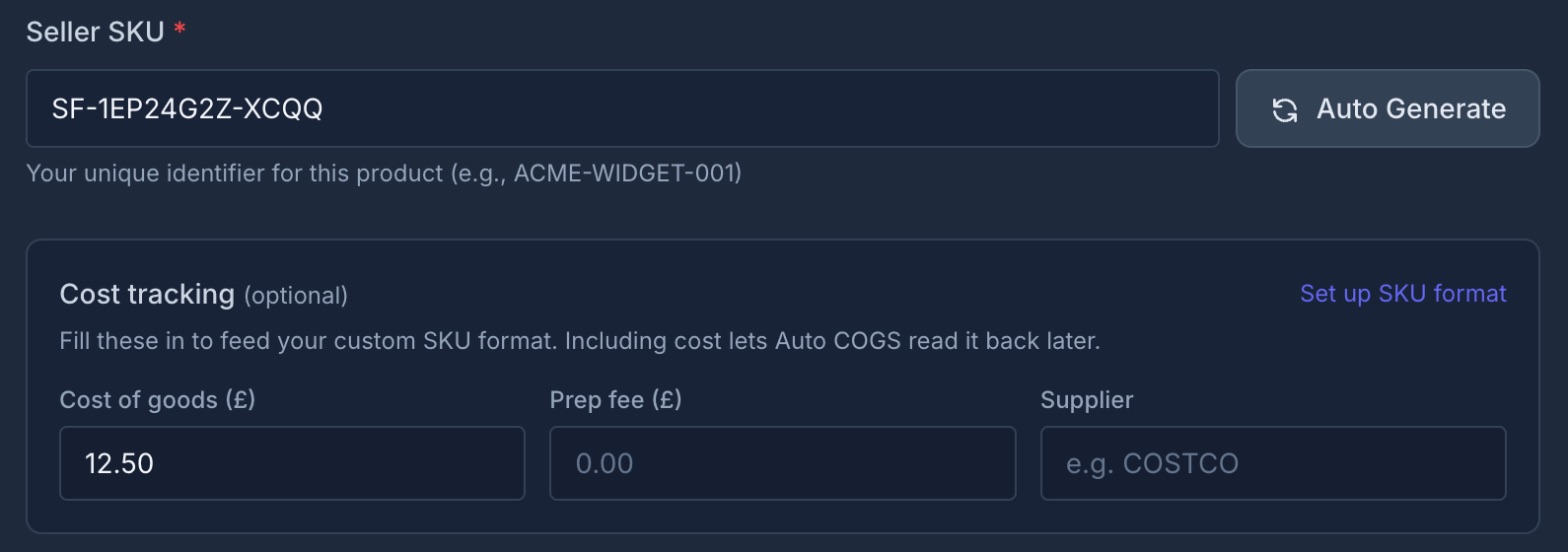
In the menu, open Amazon, then Listing Builder. Search for an ASIN and continue to the Listing Details step. The Auto Generate button sits next to the Seller SKU box.
1Set up your SKU format (once)
Click Set up SKU format next to Cost tracking, and choose what goes into your SKUs. The custom SKU builder guide explains every option.
If you skip this, Auto Generate still works and gives you a random unique SKU.
2Fill in the cost tracking fields
Under Cost tracking (optional), enter Cost of goods, Prep fee and Supplier if your SKU format uses them. If you have bought this ASIN before through the Purchasing Hub, a We think... note pre-fills them from your purchase history. Edit them if they are wrong.
3Click Auto Generate
Click Auto Generate. The SKU appears in the Seller SKU box, built from your format using whichever details it includes, such as the ASIN, cost, prep, price, supplier or condition. For example, a laptop stand that cost £12.50 could get SF-12.50-231126.
If you then change the cost, prep fee or supplier, an auto generated SKU updates to match. A SKU you typed yourself is never overwritten.
Why put your cost in the SKU?
The Listing Builder suggests a format like RETAILER-COGS as you grow. With the cost inside the SKU, as in SF-12.50-231126, Auto COGs can read the cost back later, so you have less cost of goods admin. You can also add costs the usual way, as shown in how to add your cost of goods.
Common questions
How long can a SKU be?
Up to 40 characters.
Does Auto Generate work in Bulk Upload?
The Auto Generate button is on the single listing details step. In Bulk Upload you can type a SKU after each ASIN, or use Auto-fill Missing Fields, which uses the ASIN as the SKU.
What if the SKU format can't be used?
You still get a SKU. SellerFuse falls back to a random unique SKU, so you are never blocked.
Still stuck?
Members get priority live chat from inside SellerFuse, from our UK team. Not a member yet? Ask in our Discord community, which is open to everyone.