Help Centre / Repricer
How to win the Buy Box back with the SellerFuse Buy Box Hunter
Turn on Buy Box Hunter in a rule, set its Budget, Each Drop and Wait Time, and choose whether to hold or close the gap after winning.
Why sellers use it
- Win the Buy Box when your price already matches it but Amazon gives it to someone else.
- Drops your price a penny at a time, never beyond a budget you set or below your floor.
- Hold the winning price, then edge it back up to win back margin.
Sometimes your price is the same as the Buy Box but Amazon still shows another seller's offer to shoppers. You are missing sales even though your price is right. Buy Box Hunter is an add-on to a repricing rule that tries to win it for you with small, controlled price drops, and it never spends more than the budget you give it.
How it works
- Match first. Your rule matches the Buy Box price as normal. The Hunter waits for your Wait Time to give Amazon a chance to rotate the Buy Box to you.
- Drop a step. If you still don't have it, the Hunter lowers your price by one drop, then waits again.
- Repeat until you win or reach your budget. It never goes further below the Buy Box than your Budget, and never below your ROI, profit or margin floor.
- On a win, the Hunter stops and your normal rule takes over, unless you have turned on Hold the price after winning.
- If the budget runs out without a win, it puts your price back to the Buy Box price and waits before trying again.
Where to find it
In the menu, open Repricer, then Repricing Rules. Click New rule, or open a rule and click Edit rule. Click Buy Box Hunter to open it.
1Switch it on
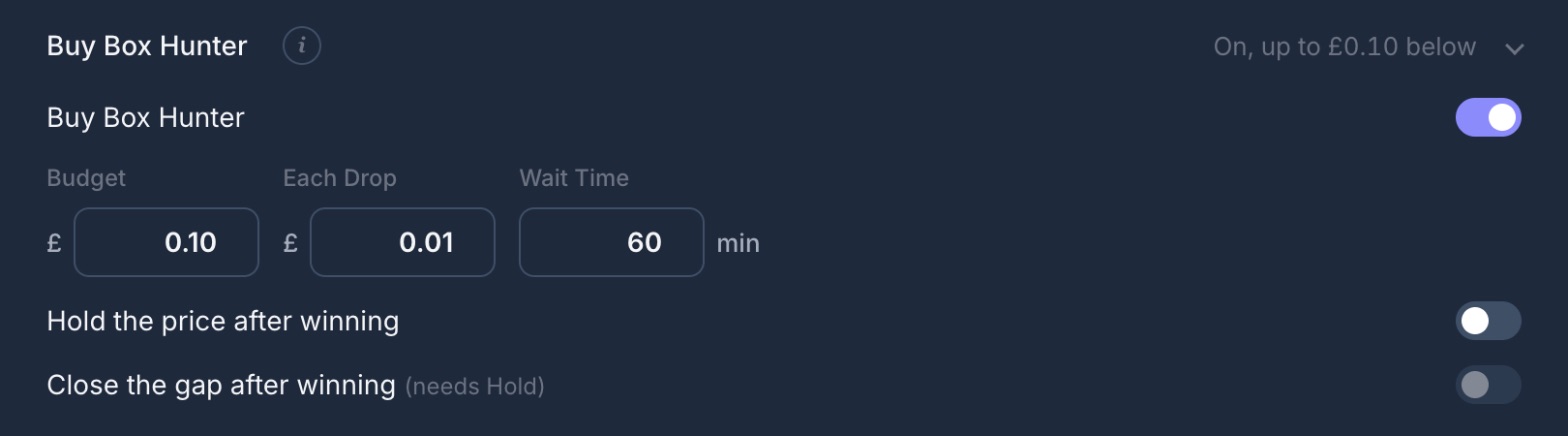
Turn on the Buy Box Hunter switch. The settings appear below it.
2Set your Budget
Budget is the most the Hunter will go below the Buy Box price in total. It can be from 1p to £10.00 and starts at 10p. For example, with a Buy Box of £15.00 and a budget of 10p, the Hunter never goes below £14.90.
3Set Each Drop
Each Drop is how much the price falls on each step. It can be from 1p to £1.00 and starts at 1p. Small drops mean you give away as little as possible to win.
4Set the Wait Time
Wait Time is how many minutes the Hunter waits between steps, so Amazon has time to respond. It can be from 30 to 1,440 minutes (24 hours) and starts at 60. Anything under 30 is set to 30.
5Choose what happens after a win
- Hold the price after winning: keeps the price that won the Buy Box instead of handing back to your rule, which might otherwise move the price up and lose it again. The hold is let go if the Buy Box price drops below your held price.
- Close the gap after winning (needs Hold): while holding, the Hunter edges your price back up one drop at a time, waiting your Wait Time between steps, towards the next competitor's price. It stays at least 1p below that seller and never goes above your Max Price. If a step up loses the Buy Box, it steps back down one drop. This only works with Hold switched on.
6Save the rule
Click Save rule. The Hunter works on every listing on this rule.
Track your hunts
From the Repricing Hub, click the Buy Box Hunter card. The page has three tabs:
- Live Hunts: cards for Active Hunts, BB Wins, Exhausted (budget used, in cooldown) and Total Undercuts, then a table of each hunt with its status, the Buy Box price, your current price, the step, the budget, the next action and a countdown. Below it, Recent Activity lists every price change the Hunter made.
- Paused: listings where the Hunter is on in the rule but not running right now, grouped by the reason.
- Hunt History: every finished hunt with its outcome, Buy Box price, steps, how much of the budget it used, how long it took and an Audit link. Cards show Total Hunts, Won and Win Rate.
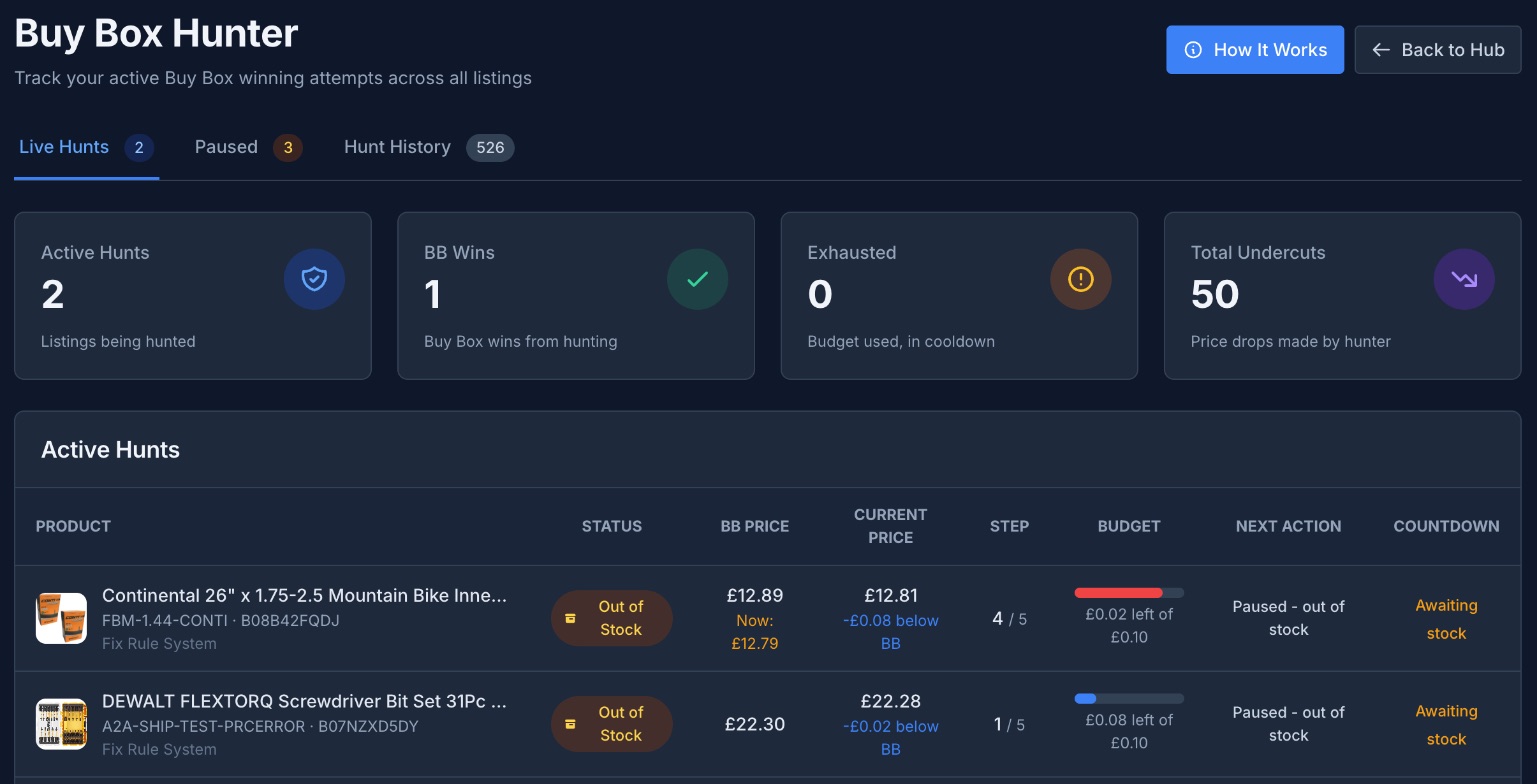
Statuses you will see include Watching (waiting before the first drop), Undercutting, Holding, Won, Cooldown and Out of Stock.
Why the Hunter might not run on a listing
The Paused tab tells you why. Common reasons:
- Floor keeps price above Buy Box: your floor stops the price reaching the Buy Box, so there is nothing to hunt.
- Your price is above the Buy Box: the Hunter starts once your rule brings the price down to match.
- Not a Featured Merchant: only Featured Merchants can win the Buy Box, so dropping the price will not help.
- Offer has no stock available now: sellers with stock get the Buy Box first. The Hunter starts again once your stock is live.
- Competitor already below the Buy Box: you are already cheaper than the Buy Box, so cutting further will not help.
Common questions
Can the Hunter sell at a loss?
Only if your rule's floor allows it. The Hunter never goes below your Min ROI, Min Profit or Min Margin, or below your Min Price when a Price Guard is on.
Is there a ready made rule with the Hunter on?
Yes. The Buy Box Hunter and Aggressive 0% ROI templates both have it switched on. See rule templates.
Why did the Hunter win and then my price went back up?
Without Hold, your normal rule takes over after a win. Turn on Hold the price after winning to keep the winning price.
Still stuck?
Members get priority live chat from inside SellerFuse, from our UK team. Not a member yet? Ask in our Discord community, which is open to everyone.