Help Centre / Listings and sourcing
How to add a seller to Storefront Stalker and follow their storefront
Find a seller's Amazon Seller ID, add them to Storefront Stalker and choose how often SellerFuse checks their storefront for new products.
Why sellers use it
- Follow any Amazon seller's storefront in a couple of minutes.
- Choose daily, weekly or manual checks to suit how fast they move.
- New products they list land in your feed with price, fees and stock.
Found a seller whose products keep selling? Add them to Storefront Stalker and SellerFuse checks their storefront on a schedule, recording every product they add or remove. This guide shows you how to find their Seller ID and set them up.
Where to find it
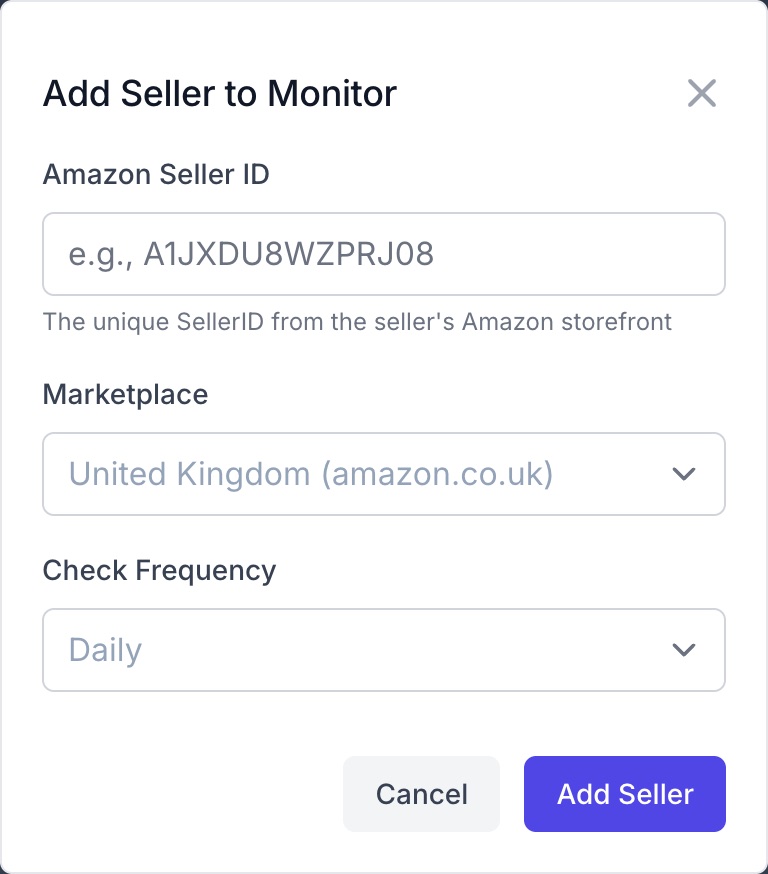
In the menu, open Amazon, then Storefront Stalker, and click Add Seller to Monitor.
Before you start
Without your own Keepa API key you can watch 3 sellers. The dashboard shows how many slots you have left. To watch more, add your key in Settings, then Integrations.
1Find the seller's ID
On Amazon, open a product the seller sells and click their name next to "Sold by" to open their storefront. The Seller ID is the code in the page address after seller=. It is a mix of capital letters and numbers.
2Enter the Seller ID
Paste the code into Amazon Seller ID.
3Choose the marketplace
Pick the Amazon store under Marketplace. It starts on United Kingdom (amazon.co.uk).
4Choose how often to check
Under Check Frequency, pick Daily, Every 2 days, Every 3 days, Weekly or Manual only (I'll check it myself). Daily is selected to start with.
5Add the seller
Click Add Seller. SellerFuse imports the storefront and shows progress as each ASIN is processed. When you see Import Complete!, click Continue. The seller now appears in Monitored Sellers.
6Name them (optional)
Click Edit seller on their row to add a Nickname and Notes, such as what they sell or why you are watching them. Click Save Changes.
What happens next
From the next check on, new products the seller lists show up in the Recent Activity Feed and the full activity feed. Learn how to filter them and check profit in how to use Storefront Stalker.
Common questions
Can I stop watching a seller?
Yes. Click Remove seller on their row.
Can I check a seller right now?
Yes. Click Force Check Now on their row at any time.
Why can't I add another seller?
You have used all your slots on the shared key. Remove a seller or add your own Keepa API key.
Still stuck?
Members get priority live chat from inside SellerFuse, from our UK team. Not a member yet? Ask in our Discord community, which is open to everyone.