Help Centre / Reimbursements and shipments
How to use the Appeals Hub to claim money back from Amazon
Learn what the Appeals Hub finds, the four kinds of claim it writes for you, their deadlines, and how it follows each case until Amazon pays.
Why sellers use it
- Find short shipments, unreturned refunds, underpaid reimbursements and warehouse losses in one place.
- Get the Seller Support message written for you, with every reference number Amazon asks for.
- Track every case until Amazon pays, with ready made follow ups when it goes quiet.
Amazon owes many sellers money they never claim: stock that arrives short, refunds where the item never came back, reimbursements below what you paid, and stock lost or damaged in the warehouse. Each one has a deadline, and once it passes the money is gone. The Appeals Hub finds these for you, writes the claim, and follows it until Amazon pays.
Where to find it
In the menu, open Amazon, then Appeals Hub. The menu item is greyed out until SellerFuse has your Amazon data.
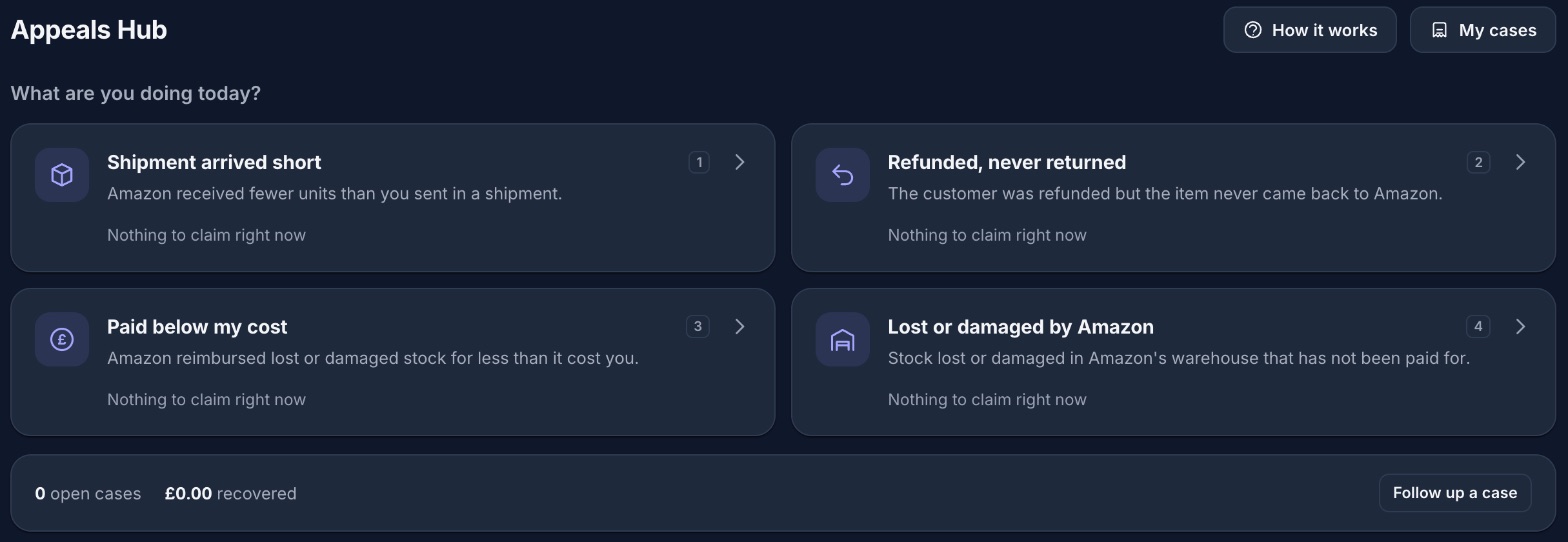
Click How it works in the top corner at any time for a short walk through. My cases, next to it, lists every claim you have saved, with a count of the ones still open.
How it works
The hub is a three step wizard. A bar across the top shows where you are.
- What are you doing today? Choose one of four claim types. Each card shows how many items you can claim, what they are worth, and how many are closing soon.
- Pick items. Tick the items you want to claim. SellerFuse groups them into cases the way Amazon wants them.
- Copy and file. Copy the subject, message and reference numbers into Seller Central, then save the case.
For the full walk through, see how to build and file a claim.
The four claim types
| Card | What it finds | When you can claim |
|---|---|---|
| Shipment arrived short | Closed shipments where Amazon received fewer units than you sent. | From 15 to 60 days after Amazon first received the shipment. |
| Refunded, never returned | Refunds where the item never came back to Amazon and Amazon has not paid you. | From 46 to 105 days after the refund. |
| Paid below my cost | Reimbursements for lost or damaged stock that paid less than your product cost. | Within 90 days of the reimbursement. |
| Lost or damaged by Amazon | Stock Amazon's inventory ledger shows as lost or damaged in its warehouses and that has not been found or paid for. | Within 60 days of the loss. |
Every item shows its claim deadline, so the ones about to expire come first. Items whose window has not opened yet are greyed out, and SellerFuse tells you the date you can claim from.
Only what is still owed
The hub takes off anything Amazon has already sorted, so you never claim twice:
- Short shipments have any inbound reimbursements for the same SKU taken off the shortfall.
- Refunds with a reimbursement on the order are hidden.
- Underpaid reimbursements are hidden if Amazon has already topped them up, re-evaluated them or paid again on the same case.
- Warehouse losses have units Amazon later found, and payments already made, taken off.
If anything is hidden because Amazon may already have sorted it, the list says how many, and Show why gives the reasons. If you think one is still owed, check it in Seller Central first.
Already opened a case yourself in Seller Central? Click Already claimed on the item. SellerFuse saves it as a case, stops suggesting it, and can still match Amazon's payment to it.
Why Paid below my cost uses product cost
Amazon reimburses lost or damaged stock at your sourcing cost, which is the cost to buy the item. Shipping, prep and duty are not included. So the hub compares Amazon's payment with your product cost only, without VAT if you are VAT registered. That is the figure Amazon will look at.
The claim, written for you
On the Copy and file step, each case comes with:
- A Subject, a Message and the Reference numbers, each with its own Copy button, plus Copy everything.
- A Standard or Short version of the message.
- Optional detail fields, such as the supplier invoice number, how the stock was delivered and the number of boxes. Anything you leave blank is highlighted so you can fill it in or delete it.
- How to file it: the Seller Central steps for that claim type, and Evidence to attach.
Follow every case until it is paid
Save each case to My cases with your Amazon case ID. When Amazon pays, SellerFuse spots the reimbursement and suggests which case it settles. If Amazon goes quiet, use the ready made follow ups: No reply yet and Ask for a second review. See how to track and follow up your claims.
Cases you save for short shipments and unreturned refunds also update the Shipments and Returns tabs in the Reconciliation Hub.
Read more about FBA reimbursements in SellerFuse.
Common questions
Does SellerFuse send the claim to Amazon?
No. You paste the message into Seller Central yourself. SellerFuse writes it, tells you where to file it, and tracks it afterwards.
Why is an item greyed out?
Its claim window has not opened yet. Amazon will not accept it before the date shown.
Why can I not put two shipments in one case?
Amazon takes one claim per shipment, and one per order for refunds, so the hub keeps them as separate cases.
Still stuck?
Members get priority live chat from inside SellerFuse, from our UK team. Not a member yet? Ask in our Discord community, which is open to everyone.