Help Centre / Repricer
How to snooze repricing on a schedule, such as overnight
Set a Master Snooze for all your rules or a custom schedule for one rule, and choose what your price does while repricing is paused.
Why sellers use it
- Pause repricing at set times every day, such as overnight, without switching rules off.
- Raise prices to your Max Price, or by an amount you choose, while the snooze runs.
- One Master Snooze covers all your rules, or give a single rule its own times.
Competition on Amazon is not the same all day. Some sellers want to stop chasing prices overnight, or lift prices at quiet times when fewer competitors are watching. Snooze lets you pause repricing on a daily schedule and choose what happens to your price during the pause, then normal repricing picks up again afterwards.
Two kinds of snooze
- Master Snooze: one schedule you set once and share across your rules.
- Custom schedule: a schedule for one rule only, used instead of the Master Snooze.
Each schedule is made of time slots. For each slot you choose a start time, an end time and an action.
What your price does during a snooze
- Do nothing: the price stays where it is.
- Max Price (called Set to Max Price on the Master Snooze page): the price moves to the listing's Max Price.
- + Fixed Amount (Increase by fixed amount): the price goes up by an amount you enter.
- + Fixed % (Increase by percentage): the price goes up by a percentage you enter.
A snooze only ever holds or raises your price. If the listing has a Price Guard, the price stays within its Min and Max. When the slot ends, the rule prices the listing as normal again.
Set up your Master Snooze
Open the Repricing Hub and click Manage Snoozes. You can also click Change next to the Master Snooze note at the top of Repricing Rules.
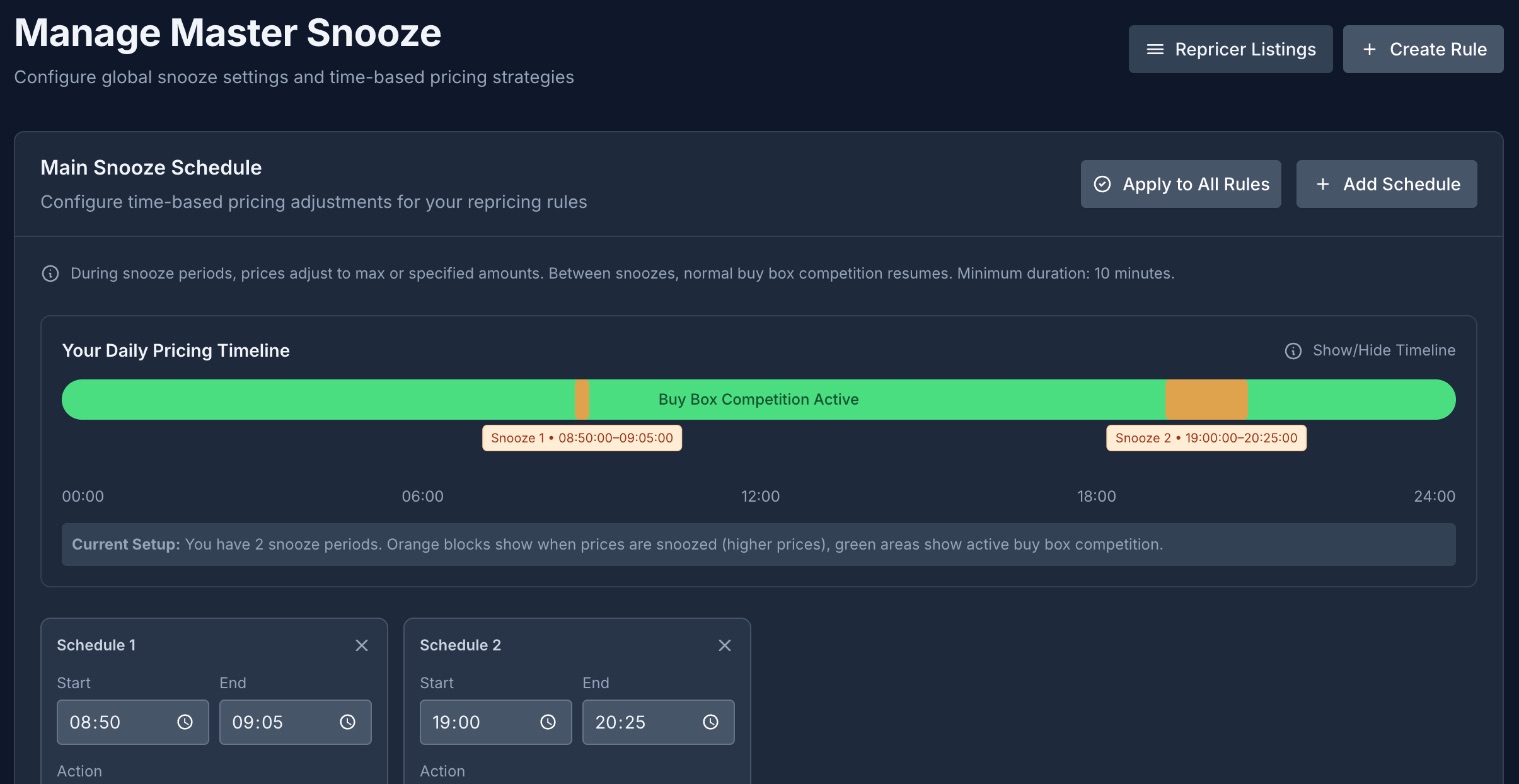
1Add a time slot
Click Add Schedule. Enter a Start and End time and choose the Action. For a fixed amount or percentage, enter the value.
2Add more slots if you need them
Add as many slots as you like. Slots cannot overlap, the end must be after the start, and each slot must be at least 10 minutes long so Amazon has time to process the price change. Your Daily Pricing Timeline shows your day at a glance, with snoozed times marked.
3Save
Click Save Timeline Schedule.
4Put rules on the Master Snooze
A rule only follows the Master Snooze if it is set to. You can do this two ways:
- Click Apply to All Rules to put every active rule on the Master Snooze. This replaces any custom snooze those rules had.
- Or set it rule by rule, as below.
Snooze one rule
In the menu, open Repricer, then Repricing Rules. Choose the rule and click Snooze, or click Edit rule and open Snooze.
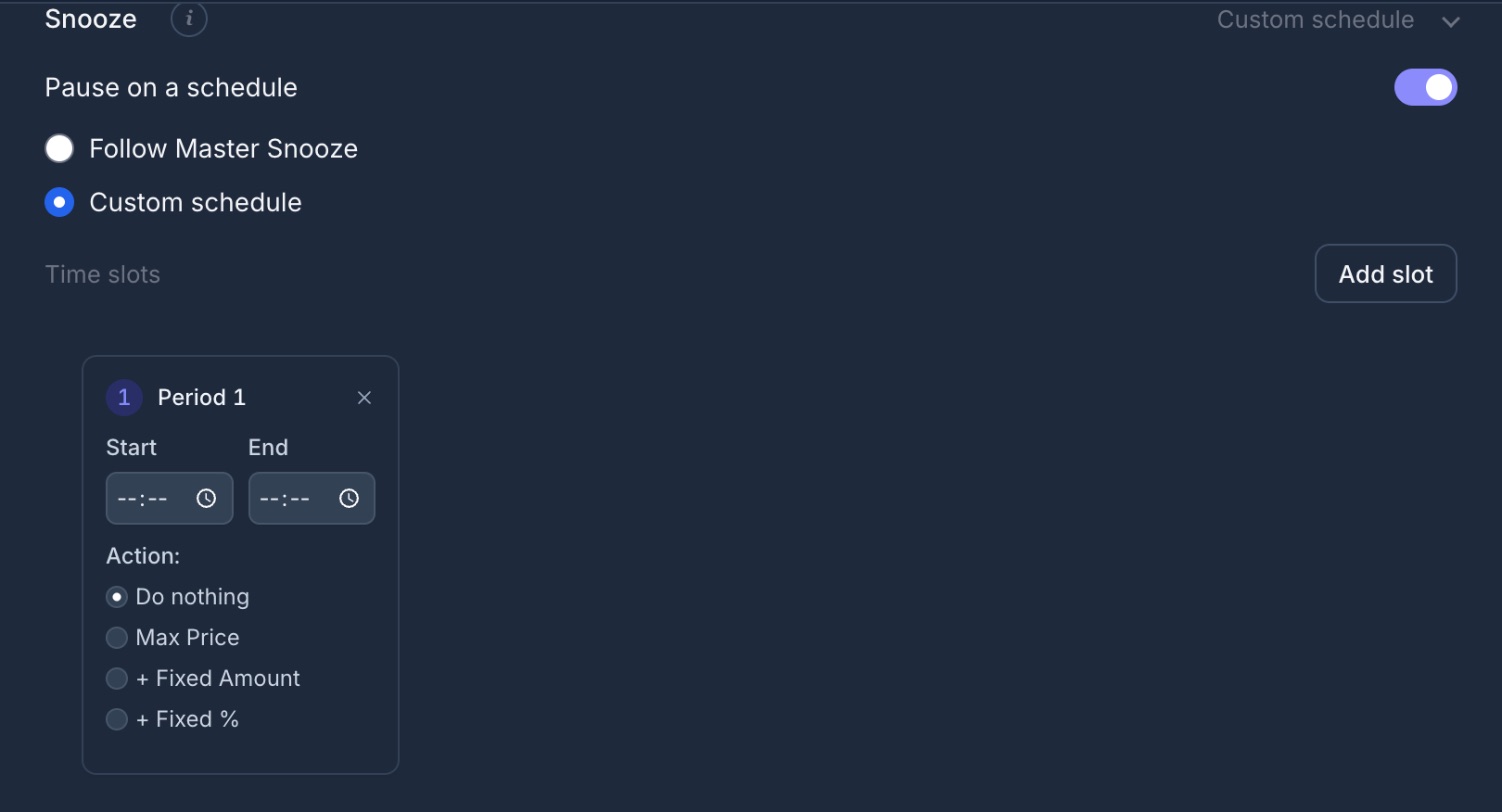
- Turn on Pause on a schedule.
- Choose Follow Master Snooze to use your Master Snooze, or Custom schedule to give this rule its own times.
- For a custom schedule, click Add slot and set the times and action for each slot.
- Click Save rule.
To stop snoozing a rule, turn Pause on a schedule off and save.
Check what is snoozed
- The top of Repricing Rules shows when your Master Snooze is next on, or until when it is on now, or "No Master Snooze set".
- A rule's This rule will panel says whether it follows the Master Snooze or has its own times.
Common questions
Can I snooze a single listing?
Snooze works on rules, not single listings. To stop one listing being repriced, set its rule to Manual on Repricer Listings, or put it on a rule with its own snooze.
Is snoozing the same as pausing a rule?
No. A paused rule stays off until you turn it back on. A snooze runs on a daily schedule and repricing starts again by itself when each slot ends.
What time zone are snooze times in?
UK time. The snooze checker runs every 5 minutes, so a slot can start or end up to a few minutes after the time you set.
Still stuck?
Members get priority live chat from inside SellerFuse, from our UK team. Not a member yet? Ask in our Discord community, which is open to everyone.