Help Centre / Listings and sourcing
How to keep Listing Builder listings UK only or add EU stores
Choose whether a new listing stays on Amazon UK, or also goes to Germany, France, Italy and Spain with its own euro price.
Why sellers use it
- Keep new listings on Amazon UK and have stray EU copies removed for you.
- List in Germany, France, Italy and Spain from the same form when you are ready.
- Get a euro price suggested from today's exchange rate for each EU store.
Amazon sometimes copies a UK listing into its EU stores on its own. If you are not set up to sell there, that can leave you with listings you never meant to create. The Listing Builder's UK only (recommended) option keeps a new listing on Amazon UK, and SellerFuse removes those copies for you. When you do want EU sales, you can add the stores from the same form.
Where to find it
In the menu, open Amazon, then Listing Builder. Search for an ASIN and continue to Listing Details. The Marketplaces section is near the bottom of the form.
Keep a listing UK only
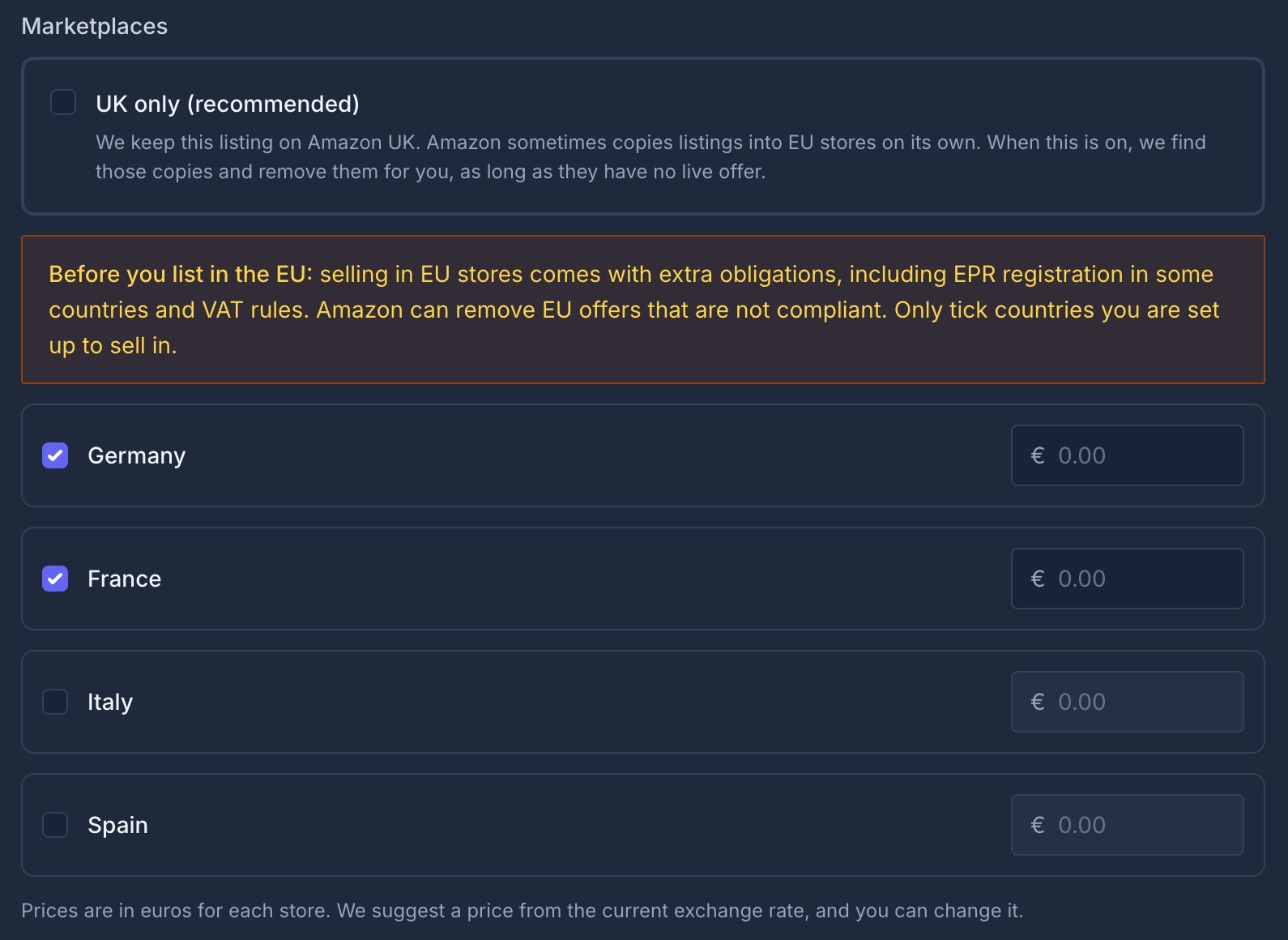
Leave UK only (recommended) ticked. New sellers start with it ticked, and after that the Listing Builder remembers your last choice.
With it on, SellerFuse looks for EU copies of the SKU that Amazon has made, and removes them as long as they have no live offer. It never removes an EU copy that has a live offer, because that may be on purpose. It sends you a notification about it instead. It also never touches an EU store you chose yourself.
Add EU stores
- Untick UK only (recommended).
- Read the note about EU selling. Some countries need EPR registration and have their own VAT rules, and Amazon can remove offers that are not compliant. Only tick countries you are set up to sell in.
- Tick Germany, France, Italy or Spain.
- Check the euro price for each store. SellerFuse suggests one from the current exchange rate and you can change it.
- Continue to Review & Submit and click Create Listing on Amazon.
The success message names each store the listing was sent to. If the UK listing worked but an EU store failed, you will see UK listing created, but some EU listings failed with the details.
Check each store
Open Listing History. For listings sent to more than one store, the On Amazon column shows each store separately, either live and buyable, or listed and waiting for stock.
Common questions
Why does Amazon copy my listings into the EU?
Amazon has account level programmes that create EU listings from your UK ones. SellerFuse can't switch those off, which is why it cleans up the copies instead.
Are Bulk Upload listings UK only?
Yes. The bulk table has no EU store fields, so bulk listings are created on Amazon UK.
Can I list in an EU store without a UK listing?
No. The Listing Builder always creates the UK listing, and EU stores are added alongside it.
Still stuck?
Members get priority live chat from inside SellerFuse, from our UK team. Not a member yet? Ask in our Discord community, which is open to everyone.