Help Centre / Payouts and finance
How to read an Amazon payout breakdown in Payout Manager
Open any past Amazon payout and see its sales, refunds, fees and VAT, down to each order, so you know exactly why it came to that amount.
Why sellers use it
- See exactly why a payout came to the amount it did.
- Drill into any line to see the orders and SKUs behind it.
- Understand periods where Amazon paid nothing and carried a balance forward.
A payout from Amazon arrives as one number in your bank, but behind it sit hundreds of sales, refunds, fees and adjustments. When a payout looks low, you need to see what came off. The breakdown in Payout Manager lays out every payout the way an accountant would, from the starting balance to the amount paid, and lets you open each line to see the orders behind it.
Where to find it
In the menu, open Amazon, then Payout Manager, and click the Disbursements tab.
1Pick a payout
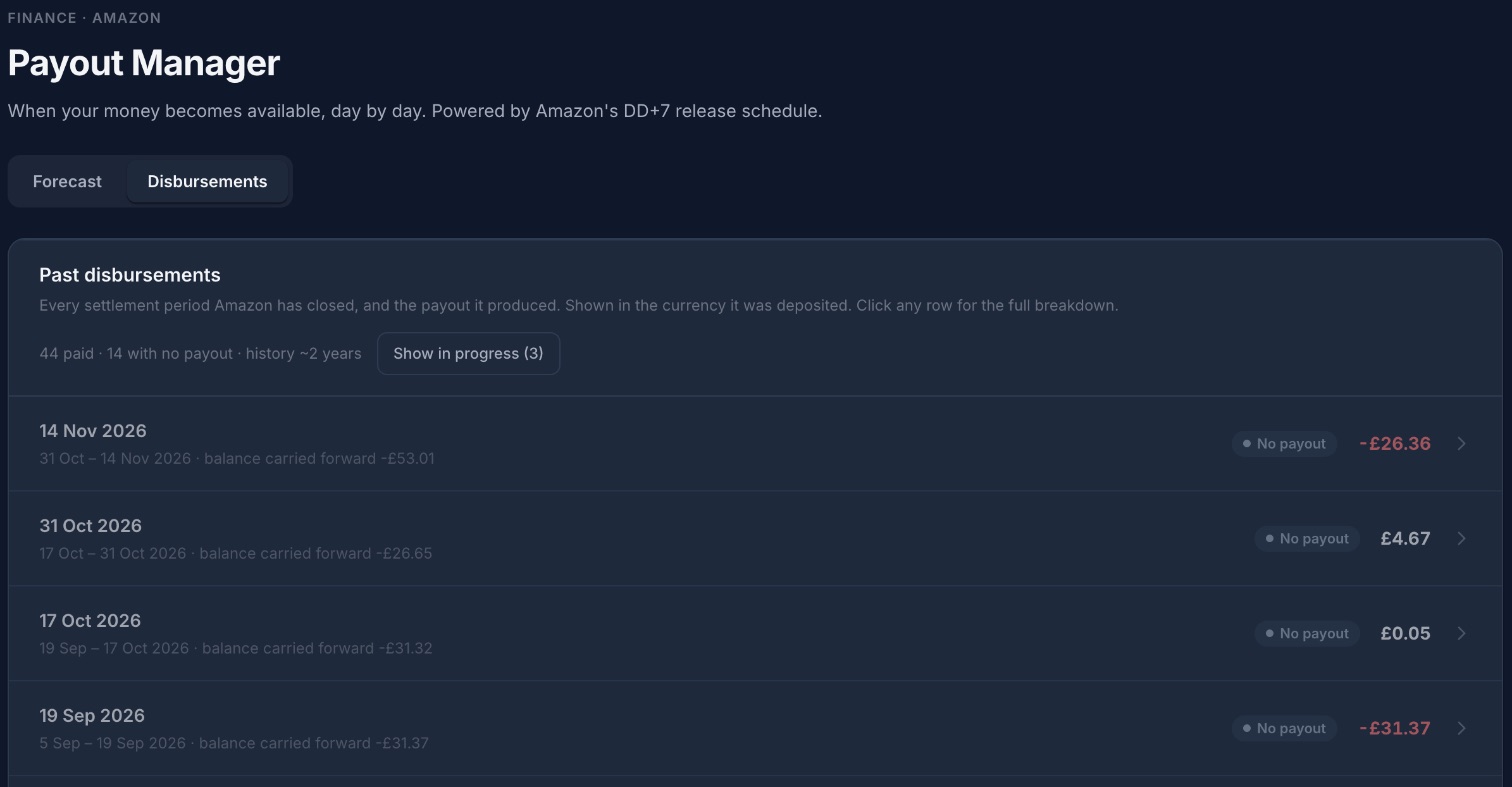
Past disbursements lists every settlement period, newest first, with the deposit date, the period it covers and the amount. Click a row to open its breakdown.
2Read the header
The top of the breakdown says Deposited and the date, or Period closed if nothing was paid. Underneath you see the settlement period, the last digits of the bank account and the status: Settled, No payout or In progress.
3Work down the ledger
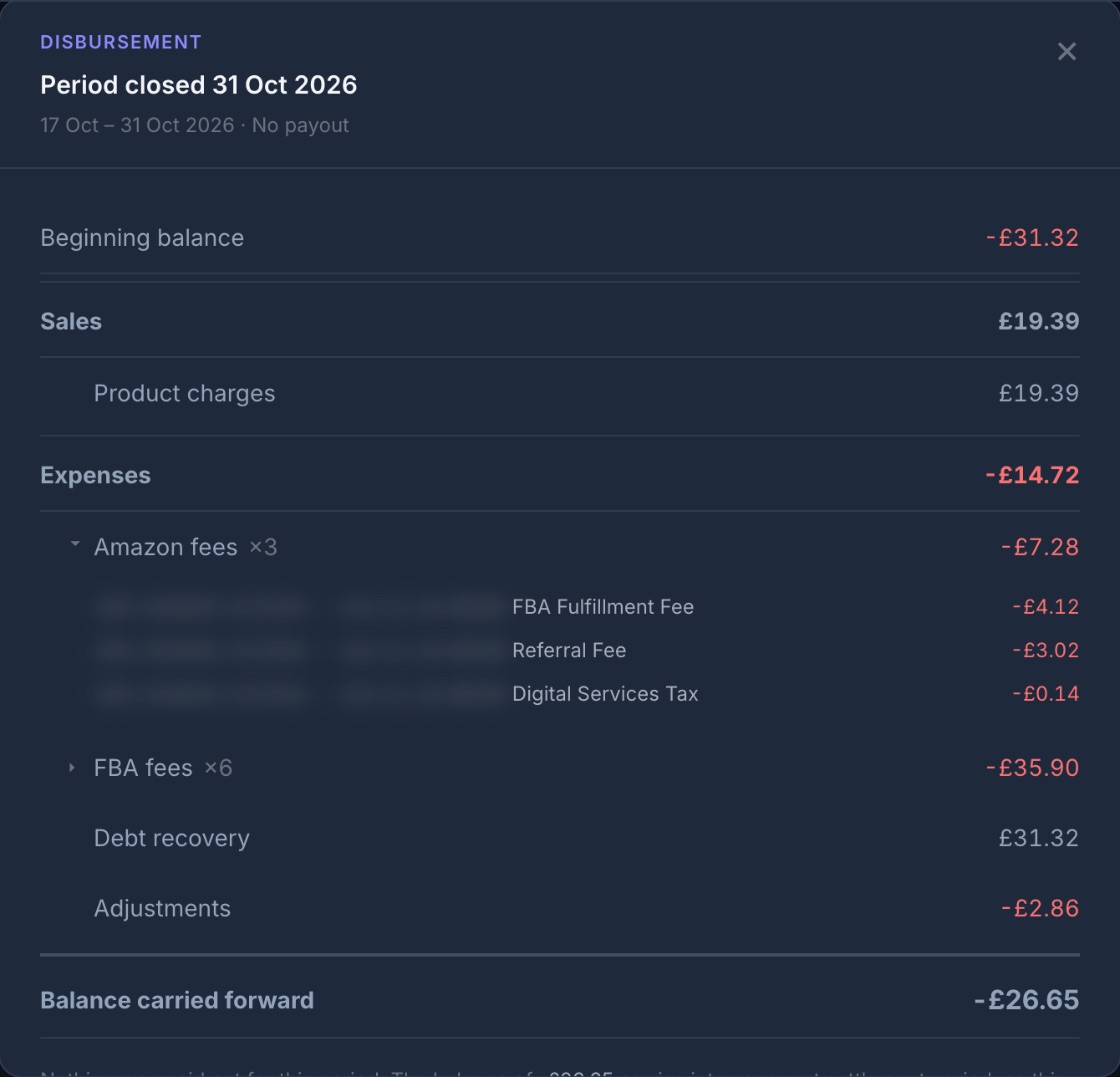
The breakdown reads from top to bottom like a bank statement:
- Beginning balance: anything carried in from the previous period.
- Sales: for example Product charges, Tax, Shipping and Inventory reimbursements.
- Refunds: Refunded sales and Refunded expenses.
- Expenses: for example Amazon fees, FBA fees, Promo rebates, Service fees, Advertising, VAT withheld, Debt recovery and Adjustments.
- Net proceeds: what the period came to.
Each group (Sales, Refunds, Expenses) shows its subtotal in bold. Negative amounts are what Amazon took off.
4Open a line to see the orders
Where a line is made up of more than one item, it has an arrow and a count, such as "×40". Click it to expand the line and see each entry with its order ID, SKU and amount. This is how you trace a large fee or refund back to the order that caused it.
Periods with no payout
If a period ends at or below zero, Amazon does not pay out. The breakdown then ends with Balance carried forward instead of Net proceeds, and a note explains that the balance carries into your next period. It also shows what activity in that period alone came to, so you can tell a one off charge from a balance building up.
Payouts in another currency
If a period settled in one currency and was paid to your bank in another, a note shows the amount that reached your bank after currency conversion.
Common questions
Why does an old payout show no detail?
Amazon only keeps line detail for a limited time. For older periods the breakdown says Line-item detail is not available for this period, and the payout total shown is still confirmed.
Where do reimbursements appear?
Under Sales, as Inventory reimbursements. To check them against your cost, see how to check Amazon reimbursements.
Why is the payout lower than my sales?
Fees, refunds, advertising and any balance owed from the last period all come off before Amazon pays. Expand the Expenses and Refunds lines to see each one.
Still stuck?
Members get priority live chat from inside SellerFuse, from our UK team. Not a member yet? Ask in our Discord community, which is open to everyone.