Help Centre / Reimbursements and shipments
How to fix stranded inventory in SellerFuse before Amazon removes it
Find FBA stock that is stuck without an active listing, see when Amazon will remove it, and relist closed listings without leaving SellerFuse.
Why sellers use it
- See every stranded unit sitting in Amazon's warehouse that cannot sell.
- Know how many days you have before Amazon removes or disposes of it.
- Relist a closed listing at a price you choose, next to the Buy Box price.
Stranded inventory is stock in Amazon's warehouse with no active listing. It cannot sell, it still runs up storage fees, and if you leave it Amazon will remove or dispose of it. The Stranded Inventory page shows every stranded item with its reason and removal date, and for closed listings it lets you relist straight from SellerFuse.
Where to find it
In the menu, open Amazon, then Stranded Inventory. The menu item is greyed out until SellerFuse has your Amazon data.
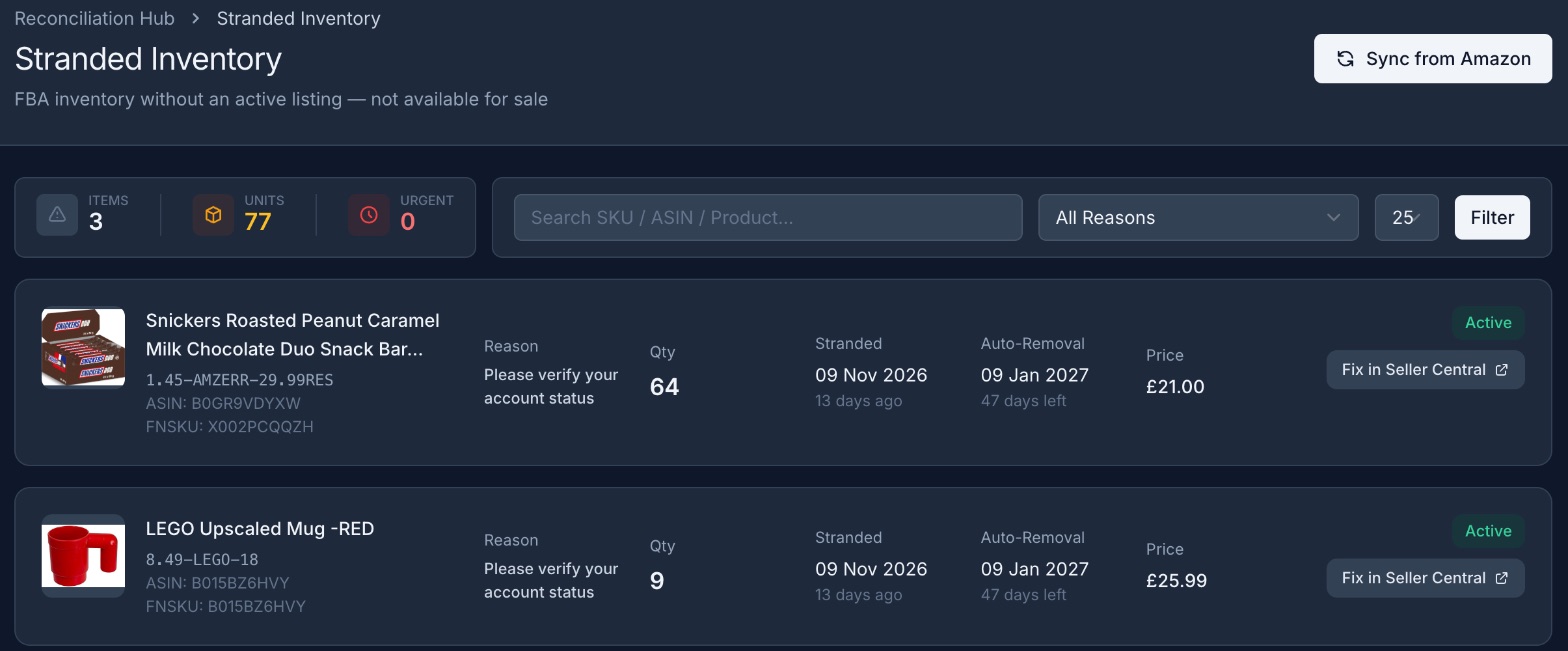
1Sync from Amazon
Click Sync from Amazon at the top of the page to pull Amazon's latest stranded inventory list. If nothing is stranded, the page says No Stranded Inventory.
2Check what is urgent
Three figures sit at the top: Items, Units and Urgent. Urgent counts items Amazon will remove within 7 days. The list is ordered with the nearest removal date first.
Items close to removal are flagged on the card itself:
- A red banner reads Auto-removal in N days, action required when 7 days or fewer are left.
- An amber banner reads Auto-removal in N days when 14 days or fewer are left.
Use the search box to find a SKU, ASIN or product, or pick a reason from All Reasons, and click Filter.
3Read each item
Each card shows the product, SKU, ASIN and FNSKU, then:
- Reason: why Amazon stranded it, such as Listing Error, Closed Listing or Merchant Fulfilled, with Amazon's suggested action.
- Qty: sellable units, plus any unfulfillable units.
- Stranded: the date it became stranded and how many days ago.
- Auto-Removal: the date Amazon will remove it and the days left.
- Price: your price on the listing.
4Fix the listing
What you can do depends on the reason.
Closed or deleted listings: Fix listing
Where the listing was closed or deleted, or Amazon suggests a relist, you see a Fix listing button.
- Click Fix listing. The Fix stranded listing box opens.
- Check the Relist price. Under Competitor pricing you see the Buy Box price and the Lowest competitor offer. Click Use next to either to copy it into the price box.
- Click Relist on Amazon.
SellerFuse relists the item as FBA at the price you confirmed. The card then shows Fix submitted and Waiting for Amazon to confirm. The listing usually reactivates within a few minutes, and the item clears from the list on the next sync. If Amazon rejected it, the card shows Last attempt failed with Amazon's reason, and you can click Fix again.
Every other reason: Fix in Seller Central
Reasons such as listing errors or restricted products need changes only Amazon's own tools can make. Click Fix in Seller Central to go straight to Amazon's fix stranded inventory page.
Common causes
| Reason | What it usually means |
|---|---|
| Listing Error | The listing is missing required information. |
| Closed Listing | The listing was deactivated. |
| Merchant Fulfilled | The listing was switched to fulfilled by you (FBM) while stock was still at Amazon. |
The guide at the foot of the page explains that Amazon removes or disposes of stranded stock automatically after 30 to 180 days. Check your Seller Central settings to choose whether items are returned to you or disposed of.
Common questions
Why don't I see a Fix listing button?
It only appears for closed or deleted listings that can be relisted. For other reasons, use Fix in Seller Central.
Does Fix listing change my price on Amazon?
Yes. It relists at the Relist price you confirm, so check it before you click Relist on Amazon.
The item is still listed after I fixed it. Why?
It clears on the next sync once Amazon confirms the listing is active. Click Sync from Amazon to check.
Still stuck?
Members get priority live chat from inside SellerFuse, from our UK team. Not a member yet? Ask in our Discord community, which is open to everyone.