Help Centre / Reimbursements and shipments
How to see which customer returns you can claim from Amazon
See refunds where the item never came back, the date each one becomes claimable, and the last day Amazon will accept your claim.
Why sellers use it
- See every refund where the customer kept the money and the item never came back.
- Each refund shows the exact date it becomes claimable and the last day to claim.
- See what returns really cost you once lost stock is counted.
When Amazon refunds a customer, the item is meant to come back to Amazon's warehouse. If it does not, and Amazon does not pay you for it, you lose both the sale and the stock. Amazon only takes a claim for these once 45 days have passed since the refund, and only up to 105 days. The Returns tab works out both dates for every refund so you know which ones to chase today.
Where to find it
In the menu, open Amazon, then Reconciliation, and click the Returns card or the Returns tab.
1Open the refunds you can claim now
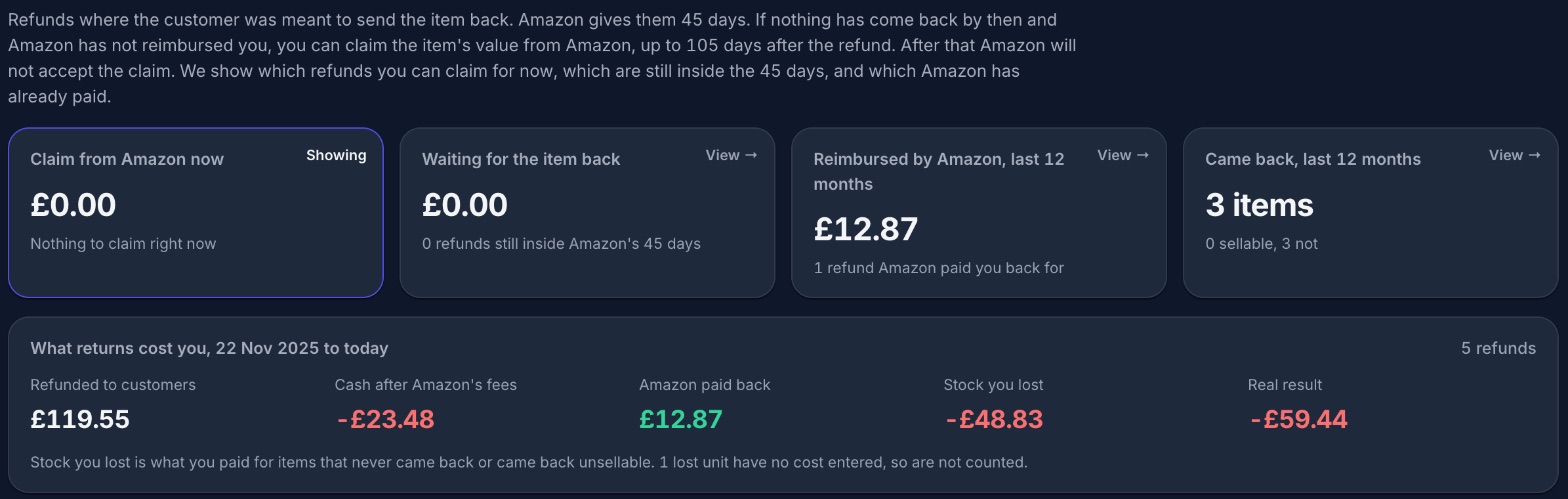
Four cards at the top double as filters:
- Claim from Amazon now: refunds past 45 days where the item never came back. These are the ones to file.
- Waiting for the item back: refunds still inside Amazon's 45 days.
- Reimbursed by Amazon, last 12 months: refunds Amazon has paid you back for.
- Came back, last 12 months: items that returned, split into sellable and not.
Click Claim from Amazon now. The quick filters underneath also cover Waiting, Too late to claim, Reimbursed, Came back, Handled, No money refunded and All. You can narrow further by return reason and refund date.
2Read the What now column
Every refund says what to do next:
- Claim from Amazon, with a claim by date and the days left.
- Wait N days, with the date it becomes claimable if the item is not back by then.
- Too late to claim, with the date Amazon's window closed.
- Amazon reimbursed you, with the amount and date.
- Nothing to do, because the item came back.
- Nothing to claim, because no money was refunded.
The Came back? column shows Yes with the item's condition, or Not yet with how many days ago the refund was.
3Check the numbers on a refund
Click the arrow at the start of a row. You see the original sale (what it sold for, Amazon's fees and what you were paid), the refund, and the net effect on you.
4File it and mark it as handled
File the claim with Amazon, or let the Appeals Hub write the message for you. Then click Mark as handled on the row so it leaves your to do list. To do several at once, tick them and use the bar that appears. Changed your mind? Click Undo on a handled row.
What returns cost you
Above the table, a strip adds up the refunds in your date range: Refunded to customers, Cash after Amazon's fees, Amazon paid back, Stock you lost and the Real result. Stock you lost is what you paid for items that never came back or came back unsellable, without the VAT you claim back if you are VAT registered. Items with no cost entered are not counted, so add your costs for a full figure.
Common questions
Why do I have to wait 45 days?
Amazon gives the customer time to send the item back and will not take a claim before then. The row shows the date it becomes claimable.
Amazon already paid me for some of these. Will they still show?
No. Refunds Amazon has reimbursed move to Reimbursed, so they are not shown as claimable.
What does Too late to claim mean?
More than 105 days have passed since the refund, so Amazon will no longer accept a claim for it.
Still stuck?
Members get priority live chat from inside SellerFuse, from our UK team. Not a member yet? Ask in our Discord community, which is open to everyone.